
Music Note Quiz: Recognizing Notes on a Staff
Loading the math board and drawing, please wait…
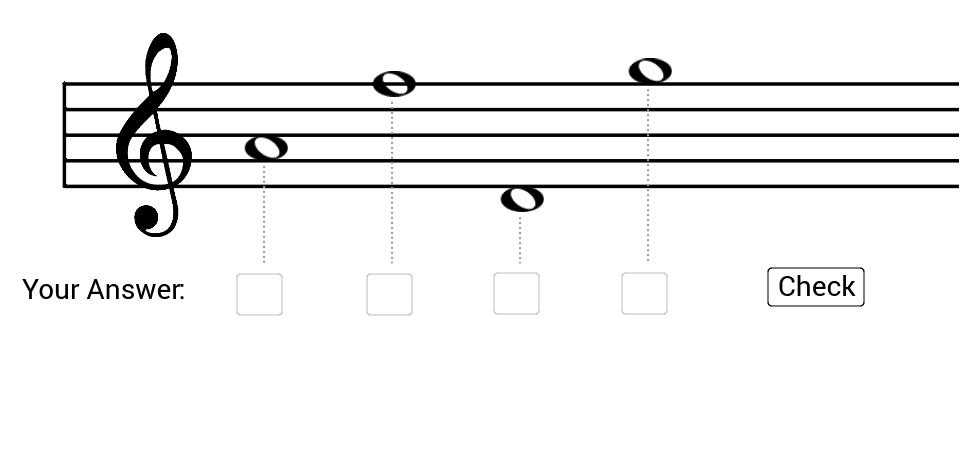
This example demonstrates how to draw musical notes on a staff using coordinate geometry. Key mathematical concepts include graphing and geometric representation. Construction involves GeoGebra commands like Sequence, Segment, and Textfield. Suitable for middle school students learning music and mathematics.
GeoGebra Commands & Parameters
Sequence(Random[1, Length[notes]] + 0 * recalc, i, 1, 4) → valsSequence(-1.5 + 0.5 * i, i, 0, Length[notes]) → nodes_{pos}Sequence(Element[nodes_{pos}, Element[vals, i]], i, 1, Length[vals]) → vals_{pos}Segment((-6, 4), (-6, 0)) → barSequence(Segment[(-5.9, i), (x(Corner[3]), i)], i, 0, 4) → staffSequence(If[Element[vals_{pos}, i] ≟ -1.5 ∨ (Element[vals_{pos}, i] ≥ 4.5), Segment[(xbase - 0.25 + (i - 1) * xdist, Element[vals_{pos}, i] + 0.5), (xbase + 2 + (i - 1) * xdist, Element[vals_{pos}, i] + 0.5)]], i, 1, Length[vals]) → staff_{support}Sequence(Segment[(xbase + 0.8 + (i - 1) * xdist, Element[vals_{pos}, i] - 0.2), (xbase + 0.8 + (i - 1) * xdist, -3)], i, 1, 4) → input_{lines}Sequence(Element[answers, i] ≟ Element[notes, Element[vals, i]], i, 1, 4) → correctTextfield(answer_1) → input_1Textfield(answer_2) → input_2Textfield(answer_3) → input_3Textfield(answer_4) → input_4Sequence(If[Element[vals_{pos}, i] ≟ 5, Segment[(xbase - 0.25 + (i - 1) * xdist, Element[vals_{pos}, i] + 0.5 - 1), (xbase + 2 + (i - 1) * xdist, Element[vals_{pos}, i] + 0.5 - 1)]], i, 1, Length[vals]) → staff_{support2}
AI Drawing Prompt Reference
Draw a musical staff with notes. Start by drawing a horizontal line as the bottom line of the staff, then draw four vertical lines as the staff lines. Next, randomly select four positions for the notes and represent them with small circles. Draw support lines for the notes at appropriate positions. Finally, draw a line below each note for input, to enter the answers.
The prompt above was compiled from the original drawing commands and is for reference only.