
Multiplying Two Matrices: Visualizing Matrix Multiplication
Loading the math board and drawing, please wait…
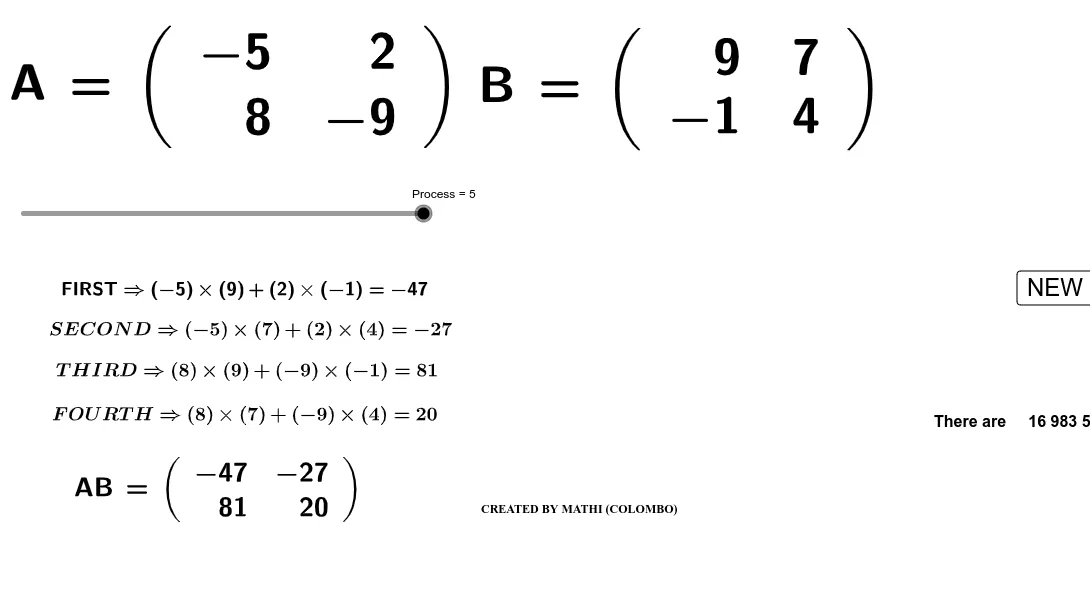
This GeoGebra example dynamically demonstrates the multiplication of two matrices, linking matrix algebra to geometric transformations such as scaling, rotation, and reflection. It visually shows how applying two successive linear transformations (represented by matrices) affects a polygon, making the abstract concept of matrix multiplication tangible. Core mathematical concepts include matrix multiplication rules, linear transformations, matrix-vector products, and composition of transformations. The construction uses the Random command to generate matrix entries, LaTeX to display formulas, Polygon objects (poly1, poly2, poly4) as the shapes being transformed, and multiple points (A through R) and segments (c_2, d_1, etc.) to track corresponding vertices before and after each transformation. Suitable for high school to undergraduate students learning linear algebra or geometric transformations, and for teachers illustrating the geometric meaning of matrix multiplication in class.
GeoGebra Commands & Parameters
Random(-9, 9) → aRandom(-9, 9) → bRandom(-9, 9) → cRandom(-9, 9) → dRandom(-9, 9) → eRandom(-9, 9) → fRandom(-9, 9) → gRandom(-9, 9) → hLaTeX(A, true, true) → text1LaTeX(B, true, true) → text2Polygon(C, D, E, F) → poly1, c_2, d_1, e_1, f_1Polygon(G, H, I, J) → poly2, g_1, h_1, i, jPolygon(O, P, Q, R) → poly4, o, p, q, rPolygon(S, T, U, V) → poly3, s, t, u, vLaTeX(AB, true, true) → text7
AI Drawing Prompt Reference
Draw two quadrilaterals poly1 and poly2, then apply a linear transformation represented by the multiplication of two matrices to poly1 using poly2 as the transformation matrix, resulting in a new quadrilateral poly4. Use random numbers to generate matrix elements and display matrices and formulas with LaTeX. Finally, show corresponding points and segments before and after the transformation.
The prompt above was compiled from the original drawing commands and is for reference only.