
Visualizing Decimal Fractions and Percentages
Loading the math board and drawing, please wait…
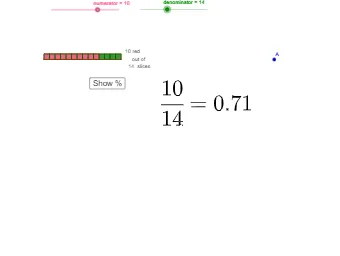
This GeoGebra example demonstrates how decimal fractions and percentages correspond to the same underlying ratio, shown through coordinated graphical elements and labeled partitions. It focuses on key math ideas: converting decimals to fractions, interpreting percents as scaled fractions (p% = p/100), and representing these relationships visually in a coordinate setting. Construction highlights include using Sequence to generate numerator/denominator or fraction-related sequences (e.g., numerator, denominator, dec, decp), using If for conditional logic that controls what is displayed (such as show100 and slice-style visibility/step behavior), and drawing proportional regions with Polygon (with multiple color-coded objects like red1/red2 and green1/green2 variants). The range and display behavior are tuned with sMinMax, while text labels and buttons (text1–text4, button1–button2) guide step-by-step exploration. Suitable for middle school through early secondary math, especially for ratio, fraction, and percent visualization and graphing-based conceptual understanding.
GeoGebra Commands & Parameters
sMinMax(up, -0.2, 0.2) → red2moveSequence(Polygon[(n, 0), (n, -1), (n + 1, -1), (n + 1, 0)], n, 1, denominator) → green1Sequence(Polygon[(n, -2 - up), (n, -3 - up), (n + slice, -3 - up), (n + slice, -2 - up)], n, 1, denominator + 1 - slice, slice) → green2Sequence(Segment[(n, -2 - up), (n, -3 - up)], n, 1, denominator + 1, (slice * 10)) → ticksSequence(Polygon[(n, 0), (n, -1), (n + 1, -1), (n + 1, 0)], n, 1, numerator) → red1If(numerator > 1, "s", "") → suffixIf(denominator > 1, "s", "") → suffix2Polygon((1, -2 - up), (1, -3 - up), (numerator + 1, -3 - up), (numerator + 1, -2 - up)) → red2, j, k, l, mPolygon((1, -2 - up), (1, -3 - up), (denominator + 1, -3 - up), (denominator + 1, -2 - up)) → green1a, f, g, h, iSequence(Text[((n - 1) * 100 / denominator) + "%", (n - 0.2, -3.5 - up)], n, 1, denominator + 1, (slice * 10)) → ticksnSequence(Polygon[(n, 0), (n, -1), (n + 1, -1), (n + 1, 0)], n, 1, denominator) → green1barSequence(Polygon[(n, -2 - up), (n, -3 - up), (n + slice, -3 - up), (n + slice, -2 - up)], n, 1, denominator + 1 - slice, slice) → green2a
AI Drawing Prompt Reference
Visualize decimal fractions and percentages using colored polygons in a coordinate system. Draw a series of polygons representing denominators, with bases on the x-axis and height -1. Then, create two sets of differently colored polygons based on the denominator and slice value, stacking them below the x-axis to represent integer and decimal parts of fractions. Add tick marks labeled with corresponding percentages. Finally, use colored bar shapes to represent different parts of the fractions and label them with percentage values.
The prompt above was compiled from the original drawing commands and is for reference only.