
Multiplying Fractions by Edward Knote
Loading the math board and drawing, please wait…
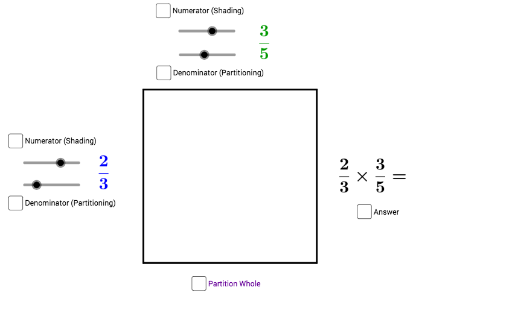
This example demonstrates how to multiply fractions using GeoGebra. The core mathematical concept involved is the multiplication of fractions. Using commands such as Intersect, Point, Polygon, and Sequence, the process of fraction multiplication is constructed. Suitable for high-grade elementary or junior high school students learning fraction operations.
GeoGebra Commands & Parameters
Intersect(xAxis, yAxis) → APoint(xAxis) → BPolygon(A, B, 4) → poly1, f, g, h, j, C, DSequence((x(B), y(B) + (i * g / d)), i, 0, d) → pointrightSequence((x(A), y(A) + (i * j / d)), i, 0, d) → pointleftSequence(Segment[Element[pointleft, i], Element[pointright, i]], i, 1, d + 1) → list2Sequence((x(D) + (i * h / b), y(D)), i, 0, b) → pointtopSequence((x(A) + (i * f / b), y(A)), i, 0, b) → pointbottomSequence(Segment[Element[pointtop, i], Element[pointbottom, i]], i, 1, b + 1) → list1Intersect(Element[list1, a + 1], Element[list2, c + 1]) → EPolygon(A, D, Element[pointtop, a + 1], Element[pointbottom, a + 1]) → poly2, a_1, d_1, i, kPolygon(A, Element[pointbottom, a + 1], E, Element[pointleft, c + 1]) → poly3, p, q, r, sIntersect(Element[list1, a + 1], f) → FSequence((x(F), y(F) + (i * g / d)), i, 0, d) → list3Sequence(Segment[Element[pointleft, i], Element[list3, i]], i, 1, d + 1) → list4
AI Drawing Prompt Reference
Draw a square grid starting from the origin on the coordinate axes, dividing the horizontal side into equal parts according to one denominator and the vertical side into equal parts according to another denominator. First construct the square and mark division points on its sides, then connect corresponding points to form two sets of parallel lines creating a grid. Mark an intersection point within the grid, and use this point along with square vertices and side division points to form two polygons representing the two parts of fraction multiplication. Finally, add another set of parallel lines inside one polygon to highlight the product area. The overall figure visualizes the geometric process of multiplying fractions.
The prompt above was compiled from the original drawing commands and is for reference only.