
Multiplication Wheel by Daniel Mentrard
Loading the math board and drawing, please wait…
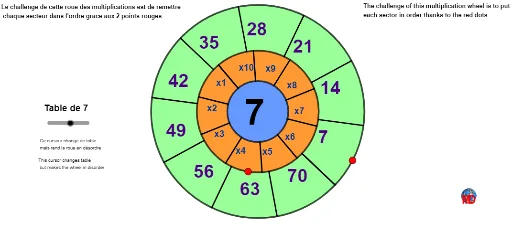
This example demonstrates a dynamic multiplication wheel, illustrating the relationship between multiplication and the unit circle through parametric equations and trigonometric functions. Key math concepts include parametric curves, limits, and the unit circle. Construction involves commands like Circle, Point, Random, Rotate, Segment, Intersect, and Sequence. Suitable for high school mathematics education, emphasizing the application of multiplication, trigonometry, and parametric equations.
GeoGebra Commands & Parameters
Circle(A, (3.5 * R)) → ePoint(e) → FCircle(A, (2 * R)) → dPoint(d) → DRandom(1, 10) → mRotate(D, m, A) → CSegment(A, C) → fCircle(A, R) → cIntersect(c, f, 1) → BSequence(Rotate[B, i, A], i, 0, (2 * π), (2 * π / 10)) → l1Sequence(Rotate[C, i, A], i, 0, (2 * π), (2 * π / 10)) → l2Random(1, 10) → pRotate(F, p, A) → ESequence(Segment[Element[l1, i], Element[l2, i]], i, 1, Length[l2]) → l3Sequence(Rotate[E, i, A], i, 0, (2 * π), (2 * π / 10)) → l4Sequence(Ray[A, Element[l4, i]], i, 1, Length[l4]) → l5Sequence(Intersect[d, Element[l5, i]], i, 1, Length[l5]) → l6Sequence(Segment[Element[l4, i], Element[l6, i]], i, 1, Length[l4]) → l7Sequence(Midpoint[Element[l2, i], Element[l1, i + 1]], i, 1, Length[l2]) → l8Sequence(Midpoint[Element[l6, i], Element[l4, i + 1]], i, 1, Length[l4]) → l10Sequence(Text[(i * Table), Element[l10, i] + (-1.2, -0.3)], i, 1, Length[l10]) → l11Sequence(Ray[A, Element[l2, i]], i, 1, Length[l2]) → l12Circle(A, R) → gCircle(A, (2 * R)) → hCircle(A, (3.5 * R)) → kSequence(Text["x" + (i), Element[l8, i] + (-0.6, -0.1)], i, 1, Length[l8]) → l9
AI Drawing Prompt Reference
Draw a dynamic multiplication wheel centered on a common center, featuring three concentric circles with radii of one, two, and three-and-a-half units. Pick a point on the innermost circle, rotate it around the center by a random integer multiple of an angle, and connect the center to this rotated point, intersecting the innermost circle at another point. Rotate both points around the center in ten equal angular steps to create two sets of points on the circle. Connect corresponding points from the two sets with ten line segments, and place multiplication labels near their midpoints. Additionally, take a point on the middle circle, rotate it similarly, and from the center draw ten rays to these rotated points, intersecting the middle circle. Connect each ray endpoint to its intersection point, and label these with product values. The final figure is a symmetric radial pattern illustrating multiplication and trigonometric relationships.
The prompt above was compiled from the original drawing commands and is for reference only.