
Ellipse Parametric Curve with Rotation Transformation
Loading the math board and drawing, please wait…
In collections
Realidades de GeoGebra
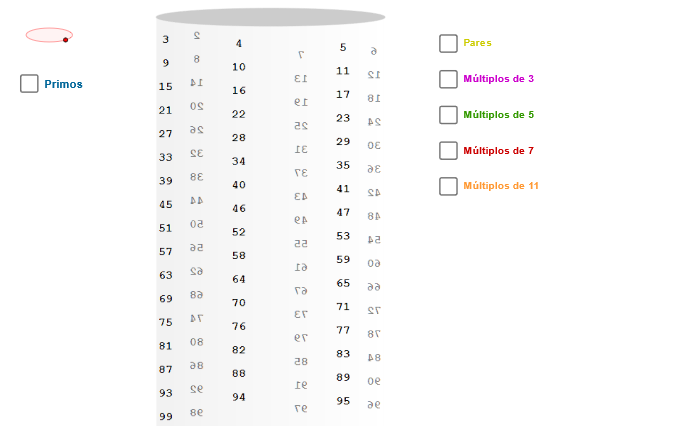
This GeoGebra example demonstrates drawing a parametric ellipse curve that rotates with changing angle. The core mathematical concepts include parametric equations, geometric properties of ellipses, trigonometric functions in coordinate transformations, and rotation/translation transformations. Construction key points: Use CurveCartesian command to define the parametric ellipse, employ Sequence and Element to generate serialized curve point sets, draw connecting lines with Segment commands, and implement dynamic rotation transformation through the rotation angle zAngRot. Suitable for high school and above students learning parametric equations, coordinate geometry, and transformation concepts, also useful for teachers demonstrating relationships between parametric curves and geometric transformations.
GeoGebra Commands & Parameters
Ellipse((-6.62, 5), (-5.38, 5), 0.65) → zElipse1Point(zElipse1) → XYCurveCartesian(((3 * cos(t)) * sin(zAngRot)) + ((3 * sin(t)) * cos(zAngRot)), (tan(p / 30) * t) + 5, t, (-34 * p), 0) → h0Sequence(h0(((-i) * p / 3)), i, 0, 98) → LSequence(Circle[h0(((-i) * p / 3)) + (0.19, 0.1), h0(((-i) * p / 3))], i, 0, 98) → L1Element(L1, 2) → p01Element(L1, 3) → p02Element(L1, 5) → p03Element(L1, 7) → p04Element(L1, 11) → p05Element(L1, 13) → p06Element(L1, 17) → p07Element(L1, 19) → p08Element(L1, 23) → p09Element(L1, 29) → p10Element(L1, 31) → p11Element(L1, 37) → p12Element(L1, 41) → p13Element(L1, 43) → p14Element(L1, 47) → p15Element(L1, 53) → p16Element(L1, 59) → p17Element(L1, 61) → p18Element(L1, 67) → p19Element(L1, 71) → p20Element(L1, 73) → p21Element(L1, 79) → p22Element(L1, 83) → p23Element(L1, 89) → p24Element(L1, 97) → p25Element(L1, 10) → m502Element(L1, 15) → m503Element(L1, 20) → m504Element(L1, 25) → m505Element(L1, 30) → m506Element(L1, 35) → m507Element(L1, 40) → m508Element(L1, 45) → m509Element(L1, 50) → m510Element(L1, 55) → m511Element(L1, 60) → m512Element(L1, 65) → m513Element(L1, 70) → m514Element(L1, 75) → m515Element(L1, 80) → m516Element(L1, 85) → m517Element(L1, 90) → m518Element(L1, 95) → m519Element(L1, 14) → m702Element(L1, 21) → m703Element(L1, 28) → m704Element(L1, 35) → m705Element(L1, 42) → m706Element(L1, 49) → m707Element(L1, 56) → m708Element(L1, 63) → m709Element(L1, 70) → m710Element(L1, 77) → m711Element(L1, 84) → m712Element(L1, 91) → m713Element(L1, 98) → m714Element(L1, 22) → m112Element(L1, 33) → m113Element(L1, 44) → m114Element(L1, 55) → m115Element(L1, 66) → m116Element(L1, 77) → m117Element(L1, 88) → m118Element(L1, 99) → m119Segment(h0(((-p)) / 3) + (0.2, -0.12), h0((-97 * p / 3)) + (0.2, -1)) → s2aSegment(h0((-p)) + (0.2, 0.1), h0((-93 * p / 3)) + (0.2, -1)) → s2bSegment(h0((-5 * p / 3)) + (0.15, 0.1), h0((-95 * p / 3)) + (0.15, -1)) → s2cSegment(h0((-2 * p / 3)) + (0.2, -0.12), h0((-98 * p / 3)) + (0.2, -1)) → s3aSegment(h0((-5 * p / 3)) + (0.2, 0.1), h0((-95 * p / 3)) + (0.2, -1)) → s3bCurveCartesian(0.2 + ((3 * cos(t + p)) * sin(zAngRot)) + ((3 * sin(t)) * cos(zAngRot)), (tan(27.7°) * t) + 10.7, t, (-11 * p), (-11 * p / 3) - 0.1) → h5CurveCartesian(0.2 + ((3 * cos(t)) * sin(zAngRot)) + ((3 * sin(t)) * cos(zAngRot)), (tan(36.4°) * t) + 13.7, t, (-17 * p / 2), (-4 * p) - 0.1) → h7CurveCartesian(0.2 + ((3 * cos(t + p)) * sin(zAngRot)) + ((3 * sin(t)) * cos(zAngRot)), (tan(49°) * t) + 17.2, t, (-33 * p / 5), (-11 * p / 3) - 0.1) → h11Ellipse((-3, 5.5), (3.4, 5.5), 3.21) → base
AI Drawing Prompt Reference
Draw a rotating parametric curve ellipse to demonstrate parametric equations, trigonometric functions, and rotation transformations. Start by plotting an ellipse, then create a curve based on a parametric equation that rotates as the angle changes. Use sequences to generate points on the curve and connect them with line segments to form a dynamically rotating ellipse.
The prompt above was compiled from the original drawing commands and is for reference only.