
Oriented Angles and Coterminal Angles on the Unit Circle
Loading the math board and drawing, please wait…
In collections
Trigonometry and Complex Numbers
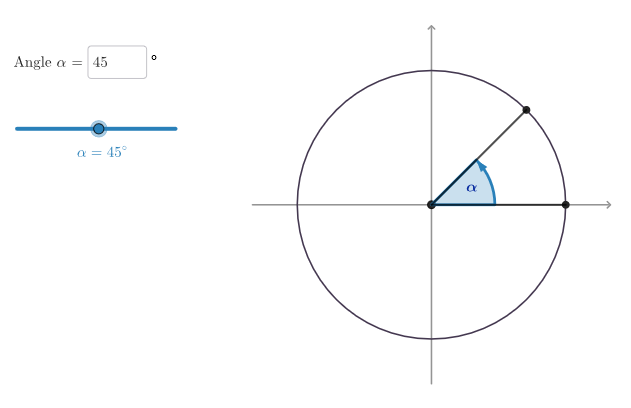
This example demonstrates how oriented (directed) angles and coterminal angles can be visualized on the unit circle, making it easy to see that different angle measures can share the same terminal side. Key concepts include directed angles (with positive/negative orientation), coterminal angles, primary angles, and the unit-circle representation that links angles to trigonometric meaning. Construction highlights in GeoGebra: Circle builds the unit circle; Angle and Rotate create and animate the directed angle and its terminal ray; Arc and Segment draw the corresponding positive/negative arcs and key segments (e.g., from the origin to points on the circle); If and Div control angle-range logic to select primary angles and map to coterminal positions; Textfield and Text present interactive values, while InputBox1, SelectedIndex, Element, and Shuffle support user input and dynamic object selection. Suitable for high school through early university learners to explore oriented angles, unit-circle geometry, and trig angle interpretation.
GeoGebra Commands & Parameters
Circle((0, 0), 6) → cMirror(P1, yAxis) → P1'Mirror(P1', xAxis) → P1''Mirror(P1'', yAxis) → P1'''Polygon(P1, P1', P1'', P1''') → peep, p1, p1', p1'', p1'''SelectedIndex(ddMenu) → isShuffle(Sequence[t, t, -18, 18]) → allA, {-18, 0, -15, -12, 1, 2, -13, -5, -11, 18, 5, -17, 14, 16, -2, 17, -14, 10, 3, 8, -10, -3, 11, -7, 9, -16, 4, 15, -9, -8, -4, -1, 7, -6, 12, 13, 6}Element(allA, Mod[countQuestion, Length[allA]] + 1) → valASegment(O, A) → segmOATextfield(angSli) → InputBox1Rotate(A, (pi * angSli / 180), O) → BAngle(B, O, A) → negAngAngle(A, O, B) → posAngSegment(O, B) → segmOBArc(c, A, B) → posArcArc(c, B, A) → negArcSegment(((-Radius[c]) - 2, 0), (Radius[c] + 2, 0)) → fakeXSegment((0, (-Radius[c]) - 2), (0, Radius[c] + 2)) → fakeYDiv(abs(angSli), 360) → nGiriIf(angSli > 0, posAng, negAng) → corrispAngIf(angSli > 0, corrispAng, 360° - abs(corrispAng)) → primaryDirectedAng
AI Drawing Prompt Reference
Draw oriented and coterminal angles on a unit circle to show how different angles share the same terminal side. Start by creating a unit circle, then rotate the terminal ray based on an input angle to form directed angles, using arcs to represent positive and negative angles. Label the primary angle and coterminal angles, and display the angle values and trigonometric interpretations to explore the relationship between angles, geometry, and trigonometry.
The prompt above was compiled from the original drawing commands and is for reference only.