
Trigonometric Circle Construction: Unit Circle Angle, Chord, and Tangent Relatio
Loading the math board and drawing, please wait…
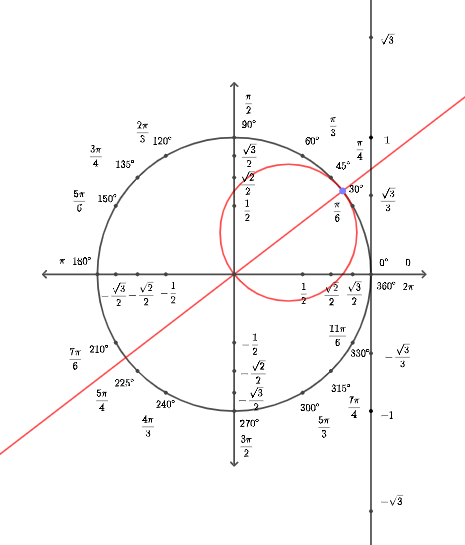
This example demonstrates how the trigonometric circle (unit circle) can be constructed to visualize angle-dependent geometric relationships. It highlights standard geometric interpretations behind trigonometric ideas—such as how angles on the unit circle determine key points, chords, and tangent-related constructions—together with the underlying circle geometry (tangency/angle behavior), perpendicular construction, and rotation-based parameterization. In GeoGebra, the build uses Intersect to compute intersection points, Point to place key locations, Circle to create the circle(s), OrthogonalLine to draw perpendicular lines, Line and Segment for the geometric primitives, Midpoint to obtain midpoints, Rotate to generate rotated configurations for varying angles, and Angle to measure/mark angles. The construction includes many labeled points (A, B, C, D, etc.), circle objects (including unit/trigonometric circle variants), and a sequence of angle labels (α, β, γ, …). Suitable for secondary education and early undergraduate trigonometry/geometry lessons, especially for interactive exploration and classroom demonstration.
GeoGebra Commands & Parameters
Intersect(xAxis, yAxis) → APoint(yAxis) → BCircle(A, B) → cIntersect(c, xAxis, 2) → COrthogonalLine(C, xAxis) → fPoint(c) → DLine(A, D) → gMidpoint(A, D) → ECircle(E, A) → dPoint(xAxis) → FPoint(xAxis) → GSegment(F, G) → hPoint(yAxis) → ISegment(H, I) → iRotate(C, 30°, A) → C'Angle(C, A, C') → αRotate(C, 45°, A) → C'_{1}Angle(C, A, C'_{1}) → βRotate(C, 60°, A) → C'_{2}Angle(C, A, C'_{2}) → γRotate(C, 120°, A) → C'_{3}Angle(C, A, C'_{3}) → δRotate(C, 150°, A) → C'_{4}Angle(C, A, C'_{4}) → εRotate(C, 135°, A) → C'_{5}Angle(C, A, C'_{5}) → ζRotate(C, 210°, A) → C'_{6}Angle(C, A, C'_{6}) → ηRotate(C, 225°, A) → C'_{7}Angle(C, A, C'_{7}) → θRotate(C, 240°, A) → C'_{8}Angle(C, A, C'_{8}) → ιRotate(C, 300°, A) → C'_{9}Angle(C, A, C'_{9}) → κRotate(C, 315°, A) → C'_{10}Angle(C, A, C'_{10}) → λRotate(C, 330°, A) → C'_{11}Angle(C, A, C'_{11}) → μOrthogonalLine(C'_{3}, h) → jOrthogonalLine(C'_{5}, h) → kOrthogonalLine(C'_{4}, h) → lOrthogonalLine(C'_{2}, h) → mOrthogonalLine(C'_{1}, h) → nOrthogonalLine(C', h) → pOrthogonalLine(C'_{2}, m) → qOrthogonalLine(C'_{1}, n) → rOrthogonalLine(C', p) → sOrthogonalLine(C'_{11}, p) → tOrthogonalLine(C'_{10}, n) → aOrthogonalLine(C'_{9}, m) → bIntersect(l, h) → JIntersect(k, h) → KIntersect(j, h) → LIntersect(m, h) → MIntersect(p, h) → NIntersect(n, h) → OIntersect(s, i) → PIntersect(r, i) → QIntersect(q, i) → RIntersect(t, i) → SIntersect(a, i) → TIntersect(b, i) → ULine(A, D) → eOrthogonalLine(C, h) → f_1Circle(A, sqrt(3)) → c_1Intersect(c_1, f_1) → V, WSegment(W, V) → g_1OrthogonalLine(B, i) → h_1Intersect(c, i, 2) → ZOrthogonalLine(Z, i) → i_1Intersect(g_1, h_1) → A_1Intersect(g_1, i_1) → B_1Circle(C, sqrt(3) / 3) → d_1Intersect(d_1, g_1) → C_1, D_1Intersect(c, i, 2) → E_1Intersect(c, h, 1) → F_1Intersect(c, i, 1) → G_1Circle(C, sqrt(3)) → e_1Line(C, C_1) → j_1Intersect(e_1, j_1, 2) → H_1Intersect(e_1, j_1, 1) → I_1Segment(H_1, I_1) → k_1Line(C, A_1) → l_1
AI Drawing Prompt Reference
Draw a unit circle to show how angles affect points on the circle, chords, and tangents. Place point A at the center and point B on the circumference. Let C be the intersection of the circle with the x-axis. Draw a perpendicular line from C to the x-axis, f. Point D is the center of the circle. Connect A and D to get line g, and E is the midpoint of A and D. Draw a circle d with center E and radius A. Place points F and G on the x-axis, and connect them to form segment h. Place point I on the y-axis, and connect I to h to form segment i. Rotate point C to get C', C'_{1}, C'_{2}, etc., and label the angles α, β, γ, etc. Draw perpendicular lines from C'_{3}, C'_{5}, C'_{4}, C'_{2}, C'_{1}, C', and C'_{11} to segment h, and also draw perpendicular lines between these points. The diagram should clearly show the unit circle, angles, chords, and tangents, suitable for educational use.
The prompt above was compiled from the original drawing commands and is for reference only.