
Integrated GeoGebra Construction: Trigonometry with Rotations, Circles & Solid-S
Loading the math board and drawing, please wait…
In collections
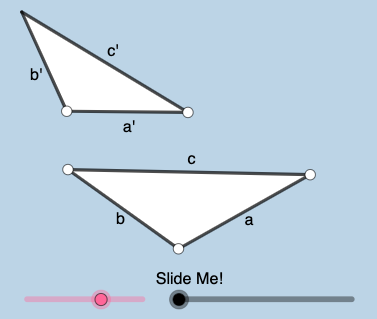
Exploration: Similar Triangles
This example demonstrates how to build a connected geometric scene where circle arcs/circular sectors are combined with rotations, translations, and dilations to create transformed configurations. The construction emphasizes measuring and controlling angles to visually link circular geometry with trigonometric thinking, while the mention of tree-diagram structure supports a step-by-step interpretation of outcomes. Key math concepts include angle–circle relationships (trigonometric functions via geometric meaning), circle and circular-sector construction, determining critical points through intersections, and using transformation geometry (vector-driven Rotate/Translate/Dilate) to preserve or reveal similarity and correspondence. Construction highlights from the provided GeoGebra command summary: Segment, Ray, Point, Line, and Polygon form the geometric backbone; OrthogonalLine, Circle, and CircleArc/CircleSector generate arcs/sectors; Intersect locates key points; Rotate, Translate, Dilate together with Vector create transformed versions; and Angle labels/reads the relevant angular measures. Suitable for high-school to early-university learners, especially for lessons on trigonometry in geometric form, transformation geometry, and intuitive solid-section visualization (with optional probabilistic tree-structure as context).
GeoGebra Commands & Parameters
Segment(A, B) → aRotate(B, (a_{2} * pi / 180), A) → B'Ray(A, B') → fPoint(f) → CSegment(A, C) → bOrthogonalLine(C, b) → rCircle(C, 1) → tIntersect(t, r, 2) → KOrthogonalLine(K, r) → i_1Point(i_1) → WRotate(E, (a_{2} * pi / 180), D) → E'Ray(D, E') → jSegment(D, E) → a'Circle(D, (a' / a * b)) → dIntersect(d, j, 1) → FSegment(D, F) → b'Line(K, b') → k_1Point(k_1) → ULine(K, a') → j_1Point(j_1) → VCircle(B, 1) → sOrthogonalLine(B, a) → qPoint(q) → MIntersect(s, q, 1) → JOrthogonalLine(J, q) → h_1Point(h_1) → PPolygon(A, B, C) → t1, c_{2}, a_1, b_{1}Polygon(D, F, E) → t2, e, d_1, f_1Min({a, a', b, b'}) → gCircle(A, (0.35 * g)) → hIntersect(h, a, 1) → GIntersect(h, b, 1) → HCircleSector(A, G, H) → kLine(A, a') → iDilate(A, If[-1 < l ≤ 0, (-l), 0], D) → A'Vector(A, A') → uTranslate(k, u) → k'Point(i) → IAngle(I, A, B) → αCircleArc(A, G, H) → pDilate(D, If[1 < l ≤ 2, 2 - l, 0], J) → D'Vector(D, D') → vTranslate(D, v) → D'_{1}Translate(E, v) → E'_{1}Segment(D'_{1}, E'_{1}) → a''Line(J, a') → g_1Point(g_1) → LAngle(P, J, L) → βRotate(D'_{1}, If[1 < l ≤ 2, ((l - 1) * β), β], D'_{1}) → NRotate(E'_{1}, If[1 < l ≤ 2, ((-(l - 1)) * β), (-β)], D'_{1}) → OSegment(N, O) → a'''Dilate(D, If[2 < l ≤ 3, 3 - l, 0], K) → D'_{2}Vector(D, D'_{2}) → wTranslate(D, w) → D'_{3}Translate(E, w) → E'_{2}Point(j_1) → QPoint(i_1) → RAngle(W, K, U) → γRotate(D'_{3}, If[2 < l ≤ 3, ((l - 2) * γ), γ], D'_{3}) → SRotate(E'_{2}, If[2 < l ≤ 3, ((l - 2) * γ), γ], D'_{3}) → TTranslate(D, w) → D'_{4}Translate(F, w) → F'Segment(D'_{4}, F') → b''Rotate(D'_{4}, If[2 < l ≤ 3, ((-(l - 2)) * γ), (-γ)], K) → ZRotate(F', If[2 < l ≤ 3, ((-(l - 2)) * γ), (-γ)], K) → F''Segment(Z, F'') → b'''Angle(A, C, B) → δIntersect(t, b, 1) → A_1Rotate(A_1, If[-3 < l ≤ -2, ((l + 3) * δ), δ], C) → B_1CircleSector(C, A_1, B_1) → e_1Dilate(C, If[-1 < l ≤ 0, (-l), 0], F) → C'Vector(C, C') → u_1Translate(e_1, u_1) → p_1Line(C, b') → l_1Point(l_1) → C_1Angle(C_1, C, A) → εSegment(F, E) → m_1Segment(B, C) → cOrthogonalLine(B, c) → r_1Circle(B, 1) → s_1Intersect(s_1, r_1, 1) → D_1Dilate(E, If[3 < l ≤ 4, 4 - l, 0], D_1) → E'_{3}Vector(E, E'_{3}) → v_1Translate(F, v_1) → F'_{1}Translate(E, v_1) → E'_{4}Segment(F'_{1}, E'_{4}) → t_1Line(E, c) → f_2Point(f_2) → E_1Angle(F, E, E_1) → ζRotate(F'_{1}, If[3 < l ≤ 4, ((l - 3) * ζ), ζ], E'_{3}) → F_1Rotate(E'_{4}, If[3 < l ≤ 4, ((l - 3) * ζ), ζ], E'_{3}) → G_1Segment(F_1, G_1) → g_2Angle(B, A, C) → ηRotate(G, If[-3 < l ≤ -2, ((l + 3) * η), η], A) → G'CircleSector(A, G, G') → d_2CircleArc(C, A_1, B_1) → e_2Rotate(p_1, If[-1 < l ≤ 0, ((-(l + 1)) * ε), (-ε)], C') → q_1Rotate(k', If[-1 < l ≤ 0, ((-(l + 1)) * α), (-α)], A') → k''
AI Drawing Prompt Reference
Draw a geometric scene with two intersecting circles and connecting line segments. One circle's center lies on the other, and geometric objects are generated through rotations and reflections. Mark key angles and connect specific points with arcs. Finally, scale and translate parts of the shape to demonstrate transformation geometry effects.
The prompt above was compiled from the original drawing commands and is for reference only.