
Geometric Construction of Arc Length and Sector Area
Loading the math board and drawing, please wait…
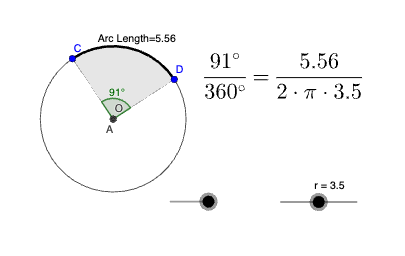
This example demonstrates how to visualize the relationship between a circle sector’s arc length and its sector area using geometric construction centered on the central angle. The key mathematical ideas include circles, circular arcs, sectors, central angles, and metric reasoning based on an angle parameter (α), along with geometric tools such as angle bisectors and scaling transformations. In GeoGebra, the construction uses Intersect to find key points, Circle to create the circle, CircleArc to generate the arc, and CircleSector to build the sector region. Point and Center establish points and the circle’s center, Angle defines the central angle, and AngularBisector constructs the angle bisector. Finally, Dilate is applied to perform a dilation for length/scale correspondence in the construction. It is suitable for middle to early high school geometry and can also serve as an intuitive starting point before topics involving trigonometry or calculus-based area/length formulations.
GeoGebra Commands & Parameters
Intersect(xAxis, yAxis) → OCircle(O, r) → cSequence(((Radius[c] * cos(u)), (Radius[c] * sin(u))), u, 0°, 359°, 1°) → l1Point(l1) → CPoint(l1) → DCircleSector(O, D, C) → dCircleArc(O, D, C) → eAngle(D, O, C) → αCenter(d) → AAngularBisector(D, O, C) → gDilate(e, 0.7, O) → e'Intersect(e', g, 1) → EIntersect(e, g) → F,
AI Drawing Prompt Reference
Draw a circle centered at point O with points C and D on the circumference. Connect O to C and D to form a sector. Draw the arc and sector area. Calculate the central angle α formed by D, O, and C, and draw the angle bisector g. Then dilate the arc e to get e'. Finally, find the intersection point E of e' with g, and the intersection point F of e with g. The figure illustrates the relationship between the sector, arc, area, central angle, and angle bisector.
The prompt above was compiled from the original drawing commands and is for reference only.