
Multiplication by Repeated Addition: Visualizing the Essence of Multiplication
Loading the math board and drawing, please wait…
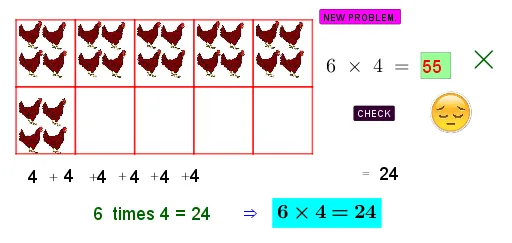
① This example visually demonstrates that multiplication is equivalent to repeated addition by translating and duplicating identical images (e.g., apples or blocks) across the canvas, making the concept intuitive for learners. ② Core mathematical concepts include the relationship between multiplication and addition, integer multiples, vector translation, and basic counting/summation. ③ Construction highlights: using GeoGebra commands such as Vector and Translate to duplicate image objects (pic1, pic2, etc.) along specified vectors, Random to generate varying quantities, Polygon to build background frames, Textfield for inputting multiplier and multiplicand, If for conditional display logic, and a button (button1) to trigger the dynamic animation. ④ Suitable for upper elementary or early middle school students learning multiplication, and for teachers to demonstrate the transition from additive to multiplicative thinking in class.
GeoGebra Commands & Parameters
Vector(A, C) → uTranslate(pic1, u) → pic1'Translate(pic1', u) → pic1''Translate(pic1, u) → pic1'_1Translate(pic1'', u) → pic1'''Translate(pic1''', Vector[(0.019999999999999574, 0)]) → pic2Translate(pic2, u) → pic2'Vector(A, D) → vTranslate(pic1, v) → pic1'_2Translate(pic1'_1, v) → pic3Translate(pic1'', v) → pic1'''_1Translate(pic2, v) → pic2'_1Translate(pic2', v) → pic2''Random(0, 10) → aRandom(0, 10) → bTranslate(pic4, Vector[(0.020000000000000018, 0.040000000000000036)]) → pic4'Translate(pic4', u) → pic4''Translate(pic4'', u) → pic4'''Translate(pic4''', u) → pic5Translate(pic5, u) → pic5'Translate(pic4', v) → pic4''_1Translate(pic4''_1, u) → pic6Translate(pic6, u) → pic6'Translate(pic6', u) → pic6''Translate(pic6'', Vector[(0, 0.040000000000000036)]) → pic6'''Translate(pic6''', u) → pic7Translate(pic8, u) → pic8'Translate(pic8', u) → pic8''Translate(pic8'', u) → pic8'''Translate(pic8''', u) → pic9Translate(pic8, v) → pic8'_1Translate(pic8', v) → pic8''_1Translate(pic8'', v) → pic8'''_1Translate(pic8''', v) → pic10Translate(pic9, v) → pic9'Translate(C, Vector[(0.26000000000000045, -0.08000000000000007)]) → C'Translate(pic11, u) → pic11'Translate(pic11', u) → pic11''Translate(pic11'', u) → pic11'''Translate(pic11''', u) → pic12Translate(pic11, v) → pic11'_1Translate(pic11'_1, u) → pic13Translate(pic13, u) → pic13'Translate(pic13', u) → pic13''Translate(pic13'', u) → pic13'''Translate(pic14, u) → pic14'Translate(pic14', u) → pic14''Translate(pic14'', u) → pic14'''Translate(pic14''', u) → pic15Translate(pic14, v) → pic14'_1Translate(pic14'_1, u) → pic16Translate(pic16, u) → pic16'Translate(pic16', u) → pic16''Translate(pic16'', u) → pic16'''Translate(pic17, Vector[(-0.020000000000000018, 0.019999999999999574)]) → pic17'Translate(pic17', u) → pic17''Translate(pic17'', u) → pic17'''Translate(pic17''', u) → pic18Translate(pic18, u) → pic18'Translate(pic17', v) → pic17''_1Translate(pic17''_1, u) → pic19Translate(pic19, u) → pic19'Translate(pic19', u) → pic19''Translate(pic19'', u) → pic19'''Translate(pic20, u) → pic20'Translate(pic20', u) → pic20''Translate(pic20'', u) → pic20'''Translate(pic20''', u) → pic21Translate(pic20, v) → pic20'_1Translate(pic20'_1, u) → pic22Translate(pic22, u) → pic22'Translate(pic22', Vector[(0.040000000000000036, 0)]) → pic22''Translate(pic22', Vector[(0.040000000000000036, 0.04)]) → pic22''_1Translate(pic22, u) → pic22'_1Translate(pic22'_1, u) → pic23Translate(pic23, u) → pic23'Translate(pic24, u) → pic24'Translate(pic24', u) → pic24''Translate(pic24'', u) → pic24'''Translate(pic24''', u) → pic25Translate(pic24, v) → pic24'_1Translate(pic24'_1, u) → pic26Translate(pic26, u) → pic26'Translate(pic26', u) → pic26''Translate(pic26'', u) → pic26'''Translate(pic27, u) → pic27'Translate(pic27', u) → pic27''Translate(pic27'', u) → pic27'''Translate(pic27''', u) → pic28Translate(pic27, v) → pic27'_1Translate(pic27'_1, Vector[(0, -0.020000000000000018)]) → pic29Translate(pic29, u) → pic29'Vector(A_1, P) → wTranslate(pic29', w) → pic29''Translate(pic29', Vector[(3.040000000000001, 0)]) → pic29''_1Translate(pic29''_1, u) → pic30Translate(pic30, u) → pic30'Translate(pic32, u) → pic32'Translate(pic32', u) → pic32''Translate(pic32'', u) → pic32'''Translate(pic32''', u) → pic31Translate(pic32, v) → pic32'_1Translate(pic32'_1, u) → pic33Translate(pic33, u) → pic33'Translate(pic33', Vector[(0.020000000000000018, 0)]) → pic33''Translate(pic33', Vector[(0.020000000000000018, 0)]) → pic33''_1Translate(pic33', Vector[(0, 0)]) → pic33''_2Translate(pic33', u) → pic33''_3Translate(pic33''_3, Vector[(0.040000000000000036, 0.020000000000000018)]) → pic34Translate(pic33', u) → pic33''_4Translate(pic33''_4, u) → pic35Polygon(G_1, H_1, J_1, I_1) → q1, g_1, h_1, j_1, i_1Translate(G_1, u) → K_1Translate(H_1, u) → L_1Translate(J_1, u) → M_1Translate(I_1, u) → N_1Polygon(K_1, L_1, M_1, N_1) → q1', k_1, l_1, m_1, n_1Translate(K_1, u) → O_1Translate(L_1, u) → P_1Translate(M_1, u) → Q_1Translate(N_1, u) → R_1Polygon(O_1, P_1, Q_1, R_1) → q1'', o_1, p_1, q_1, r_1Translate(O_1, u) → S_1Translate(P_1, u) → T_1Translate(Q_1, u) → U_1Translate(R_1, u) → V_1Polygon(S_1, T_1, U_1, V_1) → q1''', s_1, t_1, u_1, v_1Translate(S_1, u) → W_1Translate(T_1, u) → Z_1Translate(U_1, u) → A_2Translate(V_1, u) → B_2Polygon(W_1, Z_1, A_2, B_2) → q2, w_1, z_1, a_2, b_2Vector(G_1, I_1) → cTranslate(G_1, c) → C_2Translate(H_1, c) → D_2Translate(J_1, c) → E_2Translate(I_1, c) → F_2Polygon(C_2, D_2, E_2, F_2) → q1'_1, c_2, d_2, e_2, f_2Translate(C_2, u) → G_2Translate(D_2, u) → H_2Translate(E_2, u) → I_2Translate(F_2, u) → J_2Polygon(G_2, H_2, I_2, J_2) → q3, g_2, h_2, i_2, j_2Translate(G_2, u) → K_2Translate(H_2, u) → L_2Translate(I_2, u) → M_2Translate(J_2, u) → N_2Polygon(K_2, L_2, M_2, N_2) → q3', k_2, l_2, m_2, n_2Translate(K_2, u) → O_2Translate(L_2, u) → P_2Translate(M_2, u) → Q_2Translate(N_2, u) → R_2Polygon(O_2, P_2, Q_2, R_2) → q3'', o_2, p_2, q_2, r_2Translate(O_2, u) → S_2Translate(P_2, u) → T_2Translate(Q_2, u) → U_2Translate(R_2, u) → V_2Polygon(S_2, T_2, U_2, V_2) → q3''', s_2, t_2, u_2, v_2Random(0, 10) → a_1Random(0, 10) → a_3Random(0, 10) → a_4Random(0, 10) → a_5Random(0, 10) → a_6Random(0, 10) → a_7Textfield(e) → InputBox1If(e ≟ text14, text15, text16) → text17If(e ≟ text14, pic37, pic36) → pic38
AI Drawing Prompt Reference
Place a set of identical small icons (like apples or blocks) on the canvas. Duplicate them by translating horizontally at equal intervals to form a row, representing repeated addition. Then translate the entire row vertically to create multiple rows, forming a rectangular array where each row has the same count)Skip. Use a light-colored polygon to frame the whole array. Add input fields and a button nearby to adjust the multiplier and multiplicand, dynamically changing the array size. The layout is clear, emphasizing the connection between multiplication and addition.
The prompt above was compiled from the original drawing commands and is for reference only.