
Multiplication by 11 and Squaring of 2 Digit Numbers
Loading the math board and drawing, please wait…
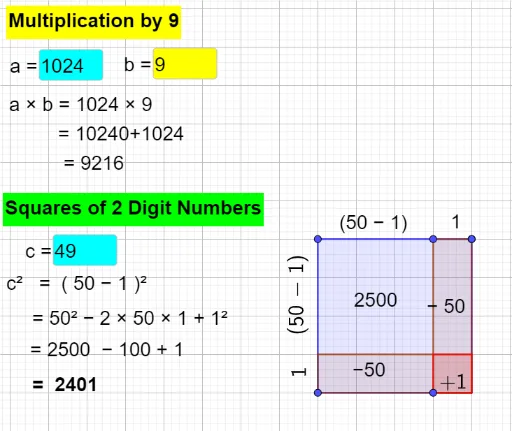
This example dynamically demonstrates the multiplication by 11 and the squaring of two-digit numbers. It involves core math concepts like multiplication techniques, square operations, and algebraic expressions. Constructed using GeoGebra commands and objects such as Textfield, Polygon, Point, Midpoint, and If. Suitable for middle school students and above for learning and understanding mathematical skills, as well as for teaching demonstrations.
GeoGebra Commands & Parameters
Textfield(a) → InputBox1Textfield(b) → InputBox2Textfield(c) → InputBox3Polygon(A, B, C, D) → q1, a_1, b_1, c_1, d_1Point(b_1) → EPolygon(H, I, J, K) → q3, h, i, j, kPolygon(L, M, N, O) → q4, l, m, n, oPolygon(P, Q, R, S) → q5, p, q, r, sPolygon(T, U, V, W) → q6, t, u, v, wPolygon(Z, A_1, B_1, C_1) → q7, z_1, f_1, g_1, h_1Polygon(D_1, E_1, F_1, G_1) → q8, i_1, j_1, k_1, l_1Polygon(G, H_1, I_1, J_1) → q2, g, f, m_1, n_1Midpoint(B_1, C_1) → K_1Midpoint(L, O) → L_1Midpoint(V, W) → M_1Midpoint(W, T) → N_1Midpoint(P, R) → O_1Midpoint(L, U) → P_1Midpoint(U, B_1) → R_1Midpoint(T, V) → Q_1Midpoint(D, C) → S_1Midpoint(K, J) → T_1Midpoint(D_1, G_1) → U_1Midpoint(A, D) → V_1Midpoint(G_1, E_1) → W_1Midpoint(G_1, K) → Z_1Midpoint(G, I_1) → A_2Midpoint(H, J) → B_2If(e < 0, false, true) → addrectMidpoint(A, C) → C_2
AI Drawing Prompt Reference
Create a dynamic illustration showing multiplication by 11 and squaring of two-digit numbers, involving multiple polygons and points to demonstrate multiplication techniques and square operations. Start by drawing a quadrilateral, then add several points and polygons based on it, connecting the midpoints of these points and polygons to form a complex geometric structure, ultimately presenting the mathematical expressions for multiplication by 11 and squaring.
The prompt above was compiled from the original drawing commands and is for reference only.