
Moment of inertia image construction example
Loading the math board and drawing, please wait…
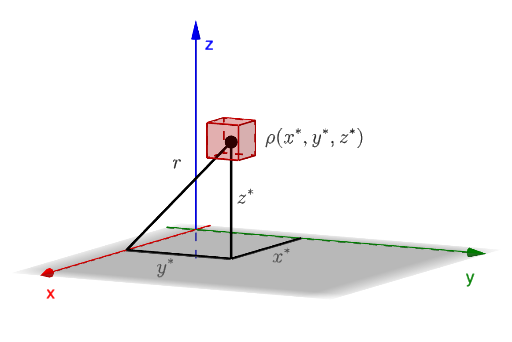
This example demonstrates constructing a moment of inertia image using GeoGebra, involving calculus concepts like rotational inertia and geometric transformations. Key construction steps include Surface, Translate, Segment commands to create 3D objects and apply translations. Suitable for high school students or college freshmen learning geometry transformations and physics concepts.
GeoGebra Commands & Parameters
Surface(((a * cos(u)) * sin(v)) + 2.5, ((b * sin(u)) * sin(v)) + 2, (c * cos(v)) + 2, u, 0, (2 * pi), v, 0, pi) → sSurface(((1 * cos(u)) * sin(v)) + 2.5, ((1 * sin(u)) * sin(v)) + 2, (2 * cos(v)) + 2, u, 0, (2 * pi), v, 0, pi) → s1Translate(Cube[((-xx), xx, zz), (xx, xx, zz), Vector[(-1 / 4 * u)]], Vector[(2.5, 2, 2)]) → cubeSegment((x(C), y(C), 0), (x(C), y(C), z(C))) → SCzSegment((x(C), y(C), 0), (0, y(C), 0)) → SCxSegment((x(C), y(C), 0), (x(C), 0, 0)) → SCySegment((x(C), 0, 0), (x(C), y(C), z(C))) → SrxMidpoint(SCx) → MXMidpoint(SCy) → MYMidpoint(SCz) → MZ
AI Drawing Prompt Reference
Draw an image demonstrating the moment of inertia, featuring two rotating surfaces and a cube that is translated by a vector, with three line segments connecting the vertices of the surfaces to the origin, and the midpoints of these segments marked to illustrate geometric transformations and physics concepts.
The prompt above was compiled from the original drawing commands and is for reference only.