
Modeling Exponential Growth & Decay: Quick Illustrator
Loading the math board and drawing, please wait…
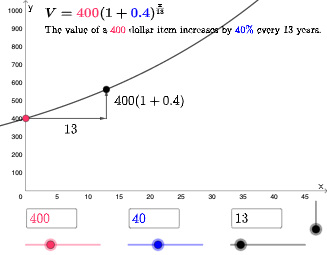
This example demonstrates the graphical phenomenon of exponential growth and decay. Key mathematical concepts include exponential functions, logarithmic functions, and percentage changes. Construction involves GeoGebra commands such as If, Textfield, and Vector. Suitable for high school or university mathematics courses to help students understand dynamic change patterns.
GeoGebra Commands & Parameters
If(b ≟ 1, (a * (1 + p / 100)^(x / n)), b ≟ 2, (a * (1 - p / 100)^(x / n))) → fTextfield(a) → InputBox2Textfield(n) → InputBox3Textfield(p) → InputBox4If(b ≟ 1, (n, (a * (1 + p / 100))), (n, (a * (1 - p / 100)))) → BVector(C, B) → uVector(A, C) → vIf(b ≟ 1, "increases", "decreases") → text7
AI Drawing Prompt Reference
Create a dynamic illustration of exponential growth and decay. Show an exponential curve whose shape depends on initial value, period count, and percentage rate, adjustable via input boxes. The curve either rises or falls based on a selected mode. Include a vector arrow from a starting point to a new point after one period, indicating the direction of change. Add a text label stating whether the value 'increases' or 'decreases'. The scene includes axes, the curve, input fields, vectors, and labels for educational demonstration.
The prompt above was compiled from the original drawing commands and is for reference only.