
Mobilis in mobili-1
Loading the math board and drawing, please wait…
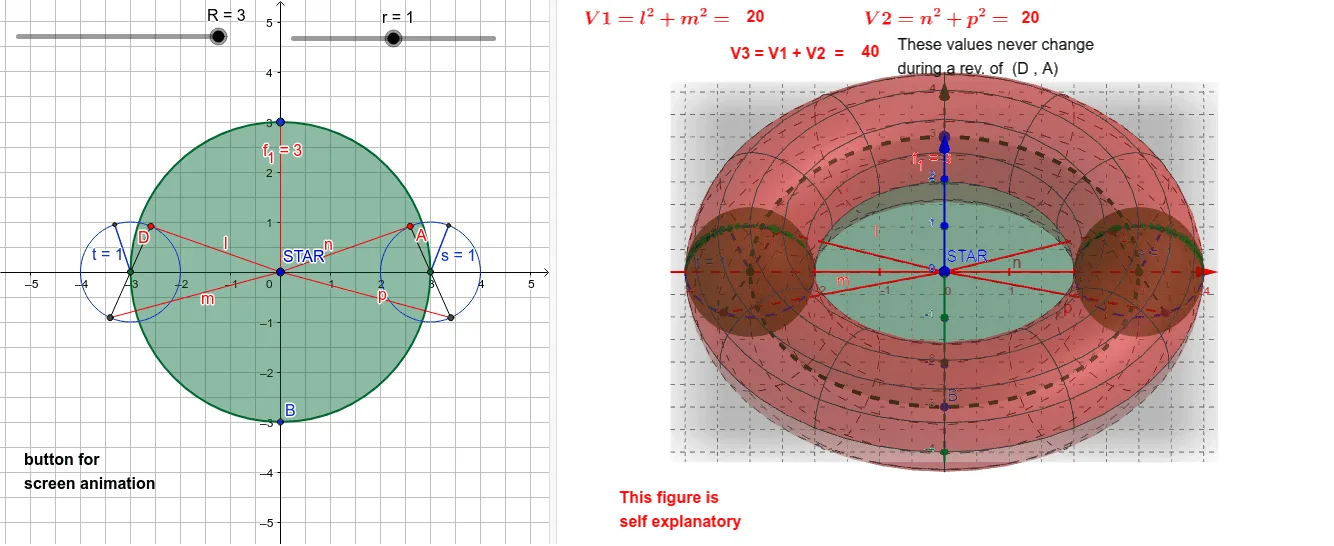
This example demonstrates the geometric phenomenon of mobilis in mobili. Key mathematical concepts include circles, geometric mean, and geometric transformations. Using GeoGebra commands such as Surface, Intersect, Circle, and Sphere, a dynamic geometric model is constructed. Suitable for high school geometry education and learning.
GeoGebra Commands & Parameters
Surface(((R + (r * cos(u))) * cos(v)), ((R + (r * cos(u))) * sin(v)), (r * sin(u)), u, 0, (2 * π), v, 0, (2 * π)) → aIntersect(xAxis, yAxis) → STARCircle(STAR, q) → cIntersect(c, yAxis) → B, CIntersect(c, xAxis, 1) → FIntersect(c, xAxis, 2) → GSphere(F, r) → bSphere(G, r) → dCircle(F, r) → eCircle(xAxis, G) → fCircle(G, r) → gPoint(g) → APoint(e) → DLine(D, F) → hIntersect(e, h, 2) → ESegment(E, D) → kLine(A, G) → iIntersect(g, i, 2) → HSegment(A, H) → jSegment(D, STAR) → lSegment(E, STAR) → mSegment(A, STAR) → nSegment(H, STAR) → pPoint(g) → IPoint(e) → JSegment(G, I) → sSegment(F, J) → tSegment(STAR, C) → f_1
AI Drawing Prompt Reference
Create a dynamic geometric model demonstrating circles, geometric mean, and transformations. Start by drawing a sphere, then find the intersection of the coordinate axes as a star. Draw circles centered at the star, intersecting the axes to get several points. Create spheres and circles at these points, connect relevant points to form line segments, resulting in a complex geometric structure suitable for high school geometry education and learning.
The prompt above was compiled from the original drawing commands and is for reference only.