
Midpoints on Quadrilateral
Loading the math board and drawing, please wait…
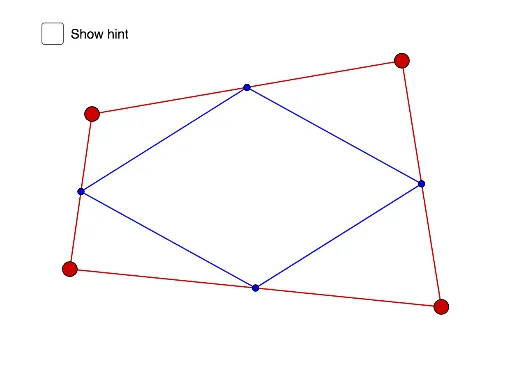
This example demonstrates the properties of a quadrilateral formed by connecting the midpoints of its sides. It involves core mathematical concepts like midpoints, line segments, and polygons. The construction uses commands such as Segment, Midpoint, and Polygon. Suitable for middle school and above students exploring geometric constructions and polygon properties.
GeoGebra Commands & Parameters
Segment(A, D) → fSegment(C, D) → gSegment(A, B) → hSegment(B, C) → iMidpoint(C, D) → EMidpoint(D, A) → FMidpoint(A, B) → GMidpoint(B, C) → HSegment(G, F) → jSegment(F, E) → kSegment(E, H) → lSegment(H, G) → mPolygon(A, C, E, F) → q1, a, c, e, f_1Polygon(F, E, D) → t1, d, f_2, e_1
AI Drawing Prompt Reference
Draw a quadrilateral and connect the midpoints of its four sides to form a new quadrilateral. First, draw the four sides of the original quadrilateral, then find the midpoint of each side and connect these midpoints to form a new quadrilateral. Finally, display both the original quadrilateral and the new quadrilateral formed by connecting the midpoints.
The prompt above was compiled from the original drawing commands and is for reference only.