
Meaning of Coordinates by GeoGebra Content Team
Loading the math board and drawing, please wait…
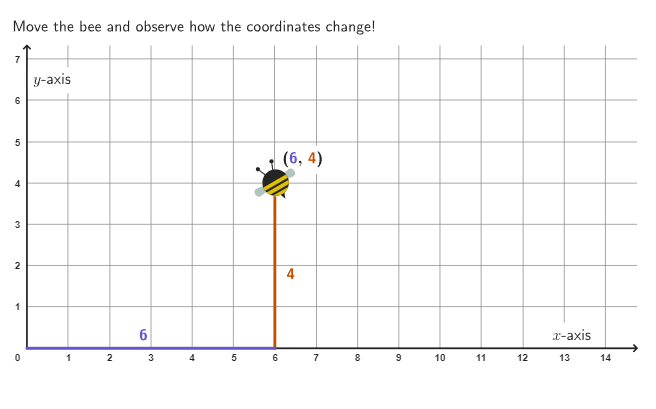
This example explores the changes in x and y coordinates by moving a bee, helping to understand the position of a point in a coordinate system. Key concepts include coordinates, coordinate pairs, and quadrants. It uses GeoGebra commands such as Polygon, PointIn, Segment, Point, Vertex, and Corner. Suitable for 4-5 grade students to learn how to locate and name points in the first quadrant of a coordinate grid.
GeoGebra Commands & Parameters
Polygon((0, 0), (13, 0), (13, 6), (0, 6)) → AreaBee, f, g, h, iPointIn(AreaBee) → PointBeeSegment((0, 0), (x(PointBee), 0)) → xCoordSegment((x(PointBee), 0), (x(PointBee), y(PointBee))) → yCoordPoint(yAxis) → FPolygon(Zip[PixelsToPoint[Corner[1], Corner[3], Corner[5], A], A, {(pixelsLeft, pixelsTop), (pixelsLeft, y(Corner[5]) - pixelsBottom), Corner[5] - (pixelsRight, pixelsBottom), (x(Corner[5]) - pixelsRight, pixelsTop)}]) → borderBoxVertex(borderBox, 1) → cornerTopLeftVertex(borderBox, 3) → cornerBottomRightSegment((0, 0), (0, y(cornerTopLeft))) → axisYSegment((0, 0), (x(cornerBottomRight), 0)) → axisXCorner(5) → appletSize
AI Drawing Prompt Reference
Draw a coordinate grid with a rectangle and a bee moving inside it. Show two axes starting from the origin, one vertical and one horizontal. As the bee moves, display its x and y coordinates, marking corresponding points on the axes. This visualization helps understand how points are located and named in the first quadrant.
The prompt above was compiled from the original drawing commands and is for reference only.