
Mean, Median, Mode, Range: Quick Check
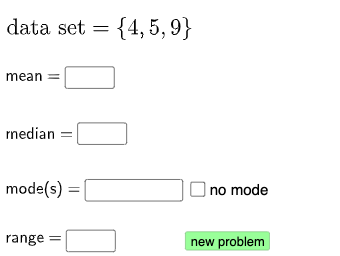
Loading the math board and drawing, please wait…
This example demonstrates how to calculate mean, median, mode, and range for a set of data using GeoGebra. Core math concepts include mean, median, mode, range, and statistical data analysis. Construction highlights involve commands/objects like Random, Sequence, mean, Median, Mode, Sort, Textfield, If, Defined, Length. Suitable for middle school students and teachers.
GeoGebra Commands & Parameters
Random(3, 8) → aSequence(Random[3, 10] + (0 * i), i, 1, a, 1) → l1, {5, 9, 4}mean(l1) → bMedian(l1) → cMode(l1) → l2Sort(l1) → l3Textfield(me) → InputBox1Textfield(med) → InputBox2Textfield(l4) → InputBox3Textfield(r) → InputBox4If(c ≟ med, "√", "X") → text3If(Max[l1] - Min[l1] ≟ r, "√", "X") → text5Defined(l4) → eLength(l4) → fSort(l2) → l5Sort(l4) → l6If(Sort[l4] ≟ Sort[l2] ∧ Length[l2] > 0 ∧ (¬d) ∨ d ∧ Length[l2] ≟ 0, "√", "X") → text4If(g ≟ me, "√", "X") → text2
AI Drawing Prompt Reference
Create a set of discrete integer data values generated randomly (at least three numbers). From the same dataset, compute the mean, median, and mode, and also compute the range as max minus min. Display four input fields for the user’s guesses of the mean, median, mode, and range, and for each comparison show a check mark if the guess matches the computed value, otherwise show a cross. Use sorting of the dataset as part of the construction so the median/mode are determined consistently, and present the resulting comparison symbols as feedback.
The prompt above was compiled from the original drawing commands and is for reference only.