
Maximum Possibility Demonstration
Loading the math board and drawing, please wait…
In collections
Open Middle: Distance and Midpoint Exercise
This example demonstrates how to explore maximum possibility problems using geometric constructions and probability statistics methods. It involves core math concepts like logarithmic functions, mode recognition, algebraic operations, tree diagrams, and angle calculations. GeoGebra commands and objects such as PointIn, Segment, SurdText, Textfield, Point, Mode, Intersect, Polygon, Midpoint, If, and Angle are used in the construction. Suitable for high school students to understand the integration of probability statistics and geometric constructions.
GeoGebra Commands & Parameters
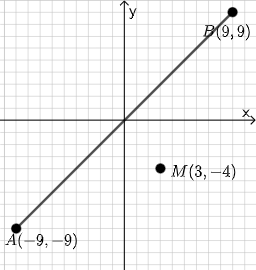
PointIn(e) → APointIn(e) → BSegment(A, B) → fSurdText(f) → text1Textfield(j) → InputBox1Textfield(k) → InputBox2Point(Circle[A, sqrt((100 * j) + (10 * k) + o)]) → CSegment(A, C) → lMode(l1) → l2Intersect(eq1, p) → DPolygon(A, D, M) → t1, f_1, g_1, h_1Segment(A, D) → qSegment(D, B) → rTextfield(o) → InputBox3Midpoint(Segment[A, B]) → EIf(mcorrect, "√", "x") → text9Segment(A, M) → i_1Segment(D, M) → j_1Angle(M, D, A) → αSegment(A, D) → k_1Segment(A, M) → l_1Segment(M, B) → m_1If(Distance[A, C] < Distance[A, M], "Too short!", Distance[A, C] > Distance[A, M], "Too long!", "This value is correct!") → text7If(Length[l2] ≟ 0, "All digits are different.", "Some digits repeat.") → text8
AI Drawing Prompt Reference
On a single plane, place two points A and B and draw segment AB. Construct a point C on a circle centered at A whose radius depends on three entered values, then draw segment AC. Use the resulting derived segment/length condition to locate an intersection point D with the chosen reference line. Create a polygon using points A, D, and a third key point M, then connect A–M, D–M, and M–B. Mark the angle α defined by points M, D, and A. Add text that compares the distance from A to C with the distance from A to M, indicating whether it is too short, too long, or correct, and also include a separate text message about whether all digits are different or some repeat.
The prompt above was compiled from the original drawing commands and is for reference only.