
Bohemia (cúpula de)
Loading the math board and drawing, please wait…
In collections
geometriadinamica.es
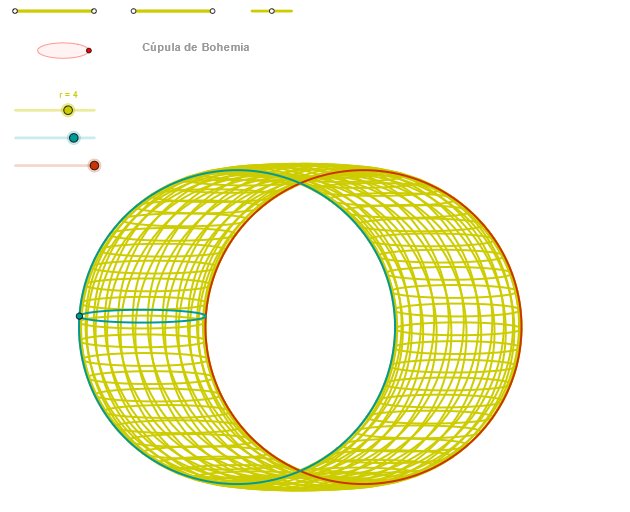
Bohemia (cúpula de) demonstrates geometric constructions and probability distributions. Key concepts include triangles, circles, angles, vectors, and functions. Construction involves GeoGebra commands like Segment, Point, OrthogonalLine, Circle, Intersect, Ellipse, Angle, CurveCartesian, and Sequence. Suitable for high school or university math courses to explore geometry and probability integration.
GeoGebra Commands & Parameters
Segment(Q3, Q4) → p2Point(p2) → P3Segment(P3, Q4) → p4Point(p4) → P4Segment(Q1, Q2) → p1Point(p1) → P1Segment(P1, Q2) → p3Point(p3) → P2OrthogonalLine(C, xAxis) → zz2Circle(C, 0.62) → zz0Intersect(zz0, zz2, 1) → ZZ4Intersect(zz0, zz2, 2) → ZZ3Ellipse(ZZ3, ZZ4, 0.65) → zElipse2Point(zElipse2) → ZIntersect(zElipse2, zz2) → ZZ7, ZZ8Angle(ZZ8, C, Z) → zAngIncOrthogonalLine(C, yAxis) → zz1Intersect(zz0, zz1, 2) → ZZ2Intersect(zz0, zz1, 1) → ZZ1Ellipse(ZZ1, ZZ2, 0.65) → zElipse1Point(zElipse1) → XYIntersect(zElipse1, zz1) → ZZ5, ZZ6Angle(ZZ6, C, XY) → zAngRotSegment(Q5, Q6) → p5Point(p5) → P5Segment(ZZ5, ZZ6) → zz4Segment(ZZ7, ZZ8) → zz3Intersect(zElipse2, zElipse1, 1) → zPunto1Intersect(zElipse2, zElipse1, 4) → zPunto2Segment(zPunto1, zPunto2) → zSeg2CurveCartesian((r / 2 * (((a * cos(u)) * sin(zAngRot)) + (((b * cos(β)) + (a * sin(u))) * cos(zAngRot)))), (r / 2 * (((((-a) * cos(u)) * cos(zAngRot)) * sin(zAngInc)) + ((((b * cos(β)) + (a * sin(u))) * sin(zAngRot)) * sin(zAngInc)) + ((c * sin(β)) * cos(zAngInc)))), u, u1, u2) → a1CurveCartesian((r / 2 * (((a * cos(u)) * sin(zAngRot)) + (((-b) + (a * sin(u))) * cos(zAngRot)))), (r / 2 * (((((-a) * cos(u)) * cos(zAngRot)) * sin(zAngInc)) + ((((-b) + (a * sin(u))) * sin(zAngRot)) * sin(zAngInc)))), u, u1, u2) → curva1Sequence(CurveCartesian[(r / 2 * (((a * cos(u)) * sin(zAngRot)) + (((b * cos(v)) + (a * sin(u))) * cos(zAngRot)))), (r / 2 * (((((-a) * cos(u)) * cos(zAngRot)) * sin(zAngInc)) + ((((b * cos(v)) + (a * sin(u))) * sin(zAngRot)) * sin(zAngInc)) + ((c * sin(v)) * cos(zAngInc)))), u, u1, u2], v, v1, v2, (2 * paso)) → list3CurveCartesian((r / 2 * (((a * cos(α)) * sin(zAngRot)) + (((b * cos(v)) + (a * sin(α))) * cos(zAngRot)))), (r / 2 * (((((-a) * cos(α)) * cos(zAngRot)) * sin(zAngInc)) + ((((b * cos(v)) + (a * sin(α))) * sin(zAngRot)) * sin(zAngInc)) + ((c * sin(v)) * cos(zAngInc)))), v, v1, v2) → curva2Sequence(CurveCartesian[(r / 2 * (((a * cos(u)) * sin(zAngRot)) + (((b * cos(v)) + (a * sin(u))) * cos(zAngRot)))), (r / 2 * (((((-a) * cos(u)) * cos(zAngRot)) * sin(zAngInc)) + ((((b * cos(v)) + (a * sin(u))) * sin(zAngRot)) * sin(zAngInc)) + ((c * sin(v)) * cos(zAngInc)))), v, v1, v2], u, u1, u2, paso) → list1
AI Drawing Prompt Reference
Draw a geometric structure with two ellipses and a circle. First, construct the foci of the two ellipses using points and line segments, then use these foci and the center to draw the ellipses. Next, construct two tangents to the ellipses using angles and the center, and use the intersection points of these tangents and the ellipses to draw the ellipses. Finally, use curve equations to draw the curves of the two ellipses and generate a series of curves using the sequence command.
The prompt above was compiled from the original drawing commands and is for reference only.