
Matching Like Terms (or Like Monomials)
Loading the math board and drawing, please wait…
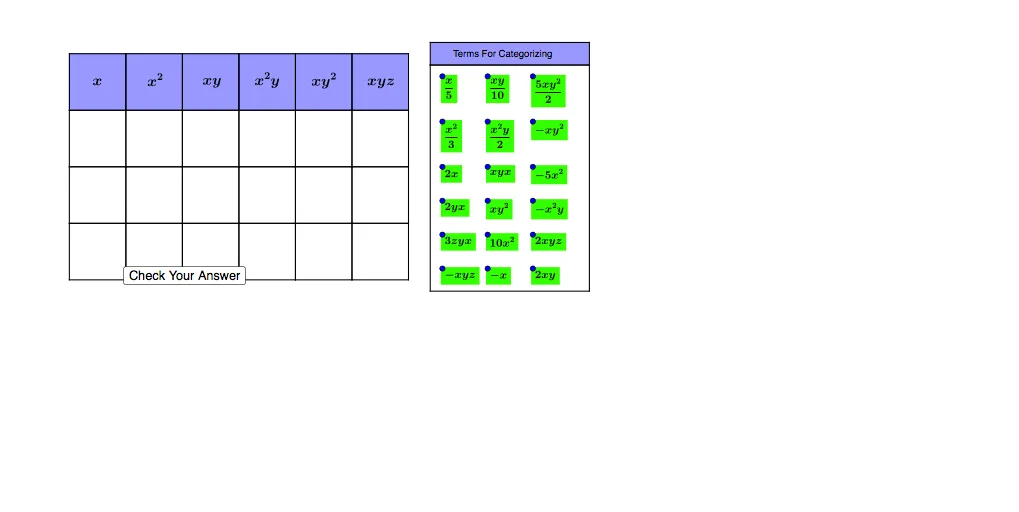
This GeoGebra example demonstrates how to match like terms (or like monomials) using geometric visual elements, combining algebraic concepts with interactive diagrams. The core mathematical concept is identifying like terms in algebra—monomials with the same variable parts (variables and exponents) that can be combined. Construction highlights: using GeoGebra commands such as Intersect, Point, Polygon, Midpoint, Line, and OrthogonalLine, the applet builds multiple polygons (poly1 to poly6) and auxiliary lines, with points (A to L) and functions (f, g, h, etc.) to create matching relationships, likely for drag-and-drop or click-based matching. Suitable for middle school or high school introductory algebra, this resource reinforces the concept of like terms and can serve as an interactive classroom exercise or self-study tool.
GeoGebra Commands & Parameters
Intersect(xAxis, yAxis) → APoint(xAxis) → BPolygon(A, B, 4) → poly1, f, g, h, i, C, DPolygon(C, B, 4) → poly2, j, k, l, m, E, FPolygon(F, E, 4) → poly3, n, p, q, r, G, HPolygon(H, G, 4) → poly4, s, t, a, b, I, JPolygon(J, I, 4) → poly5, c, d, e, f_1, K, LPolygon(L, K, 4) → poly6, g_1, h_1, i_1, j_1, M, NPolygon(B, A, 4) → poly7, k_1, l_1, m_1, n_1, O, PPolygon(E, B, 4) → poly8, p_1, q_1, r_1, s_1, Q, RPolygon(G, E, 4) → poly9, t_1, a_1, b_1, c_1, S, TPolygon(I, G, 4) → poly10, d_1, e_1, f_2, g_2, U, VPolygon(K, I, 4) → poly11, h_2, i_2, j_2, k_2, W, ZPolygon(M, K, 4) → poly12, l_2, m_2, n_2, p_2, A_1, B_1Polygon(P, O, 4) → poly13, q_2, r_2, s_2, t_2, C_1, D_1Polygon(R, P, 4) → poly14, a_2, b_2, c_2, d_2, E_1, F_1Polygon(T, R, 4) → poly15, e_2, f_3, g_3, h_3, G_1, H_1Polygon(V, T, 4) → poly16, i_3, j_3, k_3, l_3, I_1, J_1Polygon(Z, V, 4) → poly17, m_3, n_3, p_3, q_3, K_1, L_1Polygon(B_1, Z, 4) → poly18, r_3, s_3, t_3, a_3, M_1, N_1Polygon(D_1, C_1, 4) → poly19, b_3, c_3, d_3, e_3, O_1, P_1Polygon(F_1, D_1, 4) → poly20, f_4, g_4, h_4, i_4, Q_1, R_1Polygon(H_1, F_1, 4) → poly21, j_4, k_4, l_4, m_4, S_1, T_1Polygon(J_1, H_1, 4) → poly22, n_4, p_4, q_4, r_4, U_1, V_1Polygon(L_1, J_1, 4) → poly23, s_4, t_4, a_4, b_4, W_1, Z_1Polygon(N_1, L_1, 4) → poly24, c_4, d_4, e_4, f_5, A_2, B_2Midpoint(D, B) → C_2Midpoint(C, E) → D_2Midpoint(F, G) → E_2Midpoint(H, I) → F_2Midpoint(J, K) → G_2Midpoint(L, M) → H_2Midpoint(N, M) → I_2Line(B_5, A_5) → g_5Point(g_5) → J_2Point(g_5) → M_2Line(B_2, Z_1) → i_5OrthogonalLine(J_2, g_5) → j_5OrthogonalLine(M_2, g_5) → k_5Line(K_2, O_2) → h_5Intersect(j_5, h_5) → P_2Intersect(k_5, h_5) → Q_2Polygon(P_2, Q_2, M_2, J_2) → poly25, p_5, q_5, m_5, j_6Polygon(J_2, L_2, N_2, M_2) → poly26, j_7, l_5, n_5, m_6Midpoint(A, P) → L_3Midpoint(A, L_3) → M_3Midpoint(O, D_1) → N_3Midpoint(O, N_3) → O_3Midpoint(C_1, P_1) → P_3Midpoint(C_1, P_3) → Q_3Midpoint(B, R) → R_3Midpoint(B, R_3) → S_3Midpoint(P, F_1) → T_3Midpoint(P, T_3) → U_3Midpoint(D_1, R_1) → V_3Midpoint(D_1, V_3) → W_3Midpoint(E, T) → Z_3Midpoint(E, Z_3) → A_4Midpoint(G, V) → B_4Midpoint(G, B_4) → C_4Midpoint(R, H_1) → D_4Midpoint(R, D_4) → E_4Midpoint(F_1, T_1) → F_4Midpoint(F_1, F_4) → G_4Midpoint(H_1, V_1) → H_4Midpoint(H_1, H_4) → I_4Midpoint(T, J_1) → J_4Midpoint(T, J_4) → K_4Midpoint(I, Z) → L_4Midpoint(I, L_4) → M_4Midpoint(V, L_1) → N_4Midpoint(V, N_4) → O_4Midpoint(J_1, Z_1) → P_4Midpoint(J_1, P_4) → Q_4Midpoint(K, B_1) → R_4Midpoint(K, R_4) → S_4Midpoint(Z, N_1) → T_4Midpoint(Z, T_4) → U_4Midpoint(L_1, B_2) → V_4Midpoint(L_1, V_4) → W_4
AI Drawing Prompt Reference
Create a geometric diagram with multiple polygons arranged around a central point, connected by auxiliary lines and intersection points to demonstrate the concept of matching like terms in algebra. The diagram features a central intersection point with radiating polygons, each having six vertices. Auxiliary lines connect corresponding vertices of adjacent polygons, forming geometric relationships that highlight the matching and combination of like terms.
The prompt above was compiled from the original drawing commands and is for reference only.