
ACCESS - Similar Triangles Formed by Parallel Lines
Loading the math board and drawing, please wait…
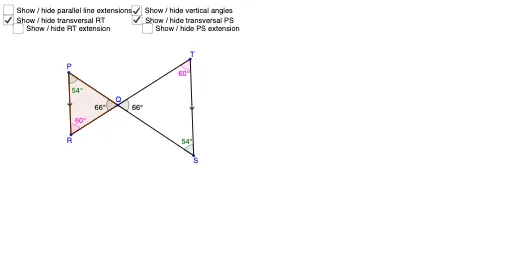
This GeoGebra example dynamically demonstrates how parallel lines intersecting a triangle create similar triangles. The core mathematical concept is the similarity of triangles, specifically the theorem that a line parallel to one side of a triangle divides the other two sides proportionally, producing triangles with equal corresponding angles and proportional side lengths. The construction uses Segment, Line, Point, Intersect, Angle, and Polygon commands to build the base triangle, draw parallel lines, mark intersection points, label angles, and form the smaller similar triangles. It is suitable for middle school geometry, high school plane geometry review, and teacher-created interactive lessons, helping students visually verify angle equality and side proportionality through dynamic dragging.
GeoGebra Commands & Parameters
Segment(P, R) → aLine(T, a) → bPoint(b) → SSegment(T, S) → cSegment(T, R) → dSegment(S, P) → eIntersect(e, d) → QLine(P, R) → fLine(T, S) → gLine(P, S) → hLine(R, T) → iAngle(T, Q, S) → αAngle(P, Q, R) → βAngle(Q, P, R) → γAngle(T, S, Q) → δAngle(Q, R, P) → εAngle(Q, T, S) → ζPolygon(P, R, Q) → t1, q, p, r
AI Drawing Prompt Reference
Draw a triangle and add two parallel lines intersecting its sides to form three smaller triangles. Label all intersection points and angles, highlighting the similarity of the triangles created by the parallel lines, with equal corresponding angles and proportional side lengths.
The prompt above was compiled from the original drawing commands and is for reference only.