
Match Subtraction and Division Expressions to Words (PR2-01-P3-Q4)
Loading the math board and drawing, please wait…
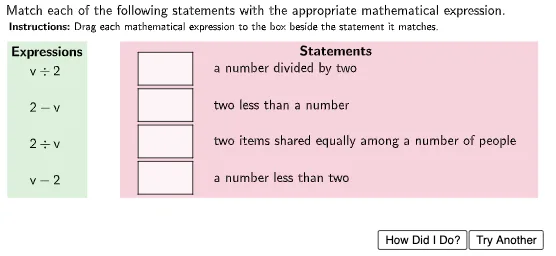
① This interactive GeoGebra activity presents a matching exercise where students pair subtraction or division expressions with corresponding word problems, reinforcing the connection between symbolic math and real-world language. ② Core mathematical concepts include subtraction, division, and translating verbal statements into algebraic expressions, with polygons used as visual elements to enhance engagement. ③ Construction highlights: the Polygon command creates decorative shapes, Shuffle randomizes answer choices, and multiple text objects (Statement1-4, Expr1-4) along with buttons (TryAnother, HowDidIDo) provide interactivity; variables (n, Numbers, StatementType) drive dynamic question generation. ④ Suitable for upper elementary or middle school students, this resource serves as a practice tool for mastering basic operations and can be used in classroom instruction or independent study.
GeoGebra Commands & Parameters
Polygon((3.5, y(StPoint1) + 0.2), (5, y(StPoint1) + 0.2), (5, y(StPoint1) - 0.7), (3.5, y(StPoint1) - 0.7)) → StBox1, f, g, h, iPolygon((3.5, y(StPoint2 + 0.2)), (5, y(StPoint2) + 0.2), (5, y(StPoint2) - 0.7), (3.5, y(StPoint2) - 0.7)) → StBox2, j, k, l, mPolygon((3.5, y(StPoint3) + 0.2), (5, y(StPoint3) + 0.2), (5, y(StPoint3) - 0.7), (3.5, y(StPoint3) - 0.7)) → StBox3, p, q, r, sPolygon((3.5, y(StPoint4) + 0.2), (5, y(StPoint4) + 0.2), (5, y(StPoint4) - 0.7), (3.5, y(StPoint4) - 0.7)) → StBox4, t, a, b, cPolygon(ExPoint2Cen, ExPoint2Cen + (1.5, 0), ExPoint2Cen + (1.5, -0.7), ExPoint2Cen + (0, -0.7)) → DragBox2, g_1, h_1, i_1, f_2Polygon(ExPoint3Cen, ExPoint3Cen + (1.5, 0), ExPoint3Cen + (1.5, -0.7), ExPoint3Cen + (0, -0.7)) → DragBox3, j_1, k_1, l_1, g_2Polygon((-0.1, 6.8), (2.1, 6.8), (2.1, 2.5), (-0.1, 2.5)) → ExpressionsBox, q_1, r_1, s_1, t_1Polygon((3, 6.8), (14.5, 6.8), (14.5, 2.5), (3, 2.5)) → StatementsBox, a_1, b_1, c_1, d_1Polygon(ExPoint1Cen, ExPoint1Cen + (1.5, 0), ExPoint1Cen + (1.5, -0.7), ExPoint1Cen + (0, -0.7)) → DragBox1, d, e, f_1, e_1Polygon(ExPoint4Cen, ExPoint4Cen + (1.5, 0), ExPoint4Cen + (1.5, -0.7), ExPoint4Cen + (0, -0.7)) → DragBox4, m_1, n_1, p_1, h_2Shuffle({(5.5, 6.3), (5.5, 5.3), (5.5, 4.3), (5.5, 3.3)}) → StatementPointsList, {(5.5, 3.3), (5.5, 5.3), (5.5, 4.3), (5.5, 6.3)}Shuffle({(1, 5.9), (1, 4.9), (1, 3.9), (1, 2.9)}) → ExprPointsList, {(1, 4.9), (1, 2.9), (1, 3.9), (1, 5.9)}
AI Drawing Prompt Reference
Create an interactive math exercise diagram with multiple colored boxes and two longer rectangles. The boxes contain mathematical expressions and corresponding word problems, with draggable boxes below for matching. Decorate the top with four small colored boxes for aesthetic appeal, arranged in a clear layout to help students practice matching subtraction and division expressions with word problems, enhancing engagement.
The prompt above was compiled from the original drawing commands and is for reference only.