
Making Similar Triangles 3: Dynamic Construction and Parametric Exploration
Loading the math board and drawing, please wait…
In collections
Making Similar Triangles
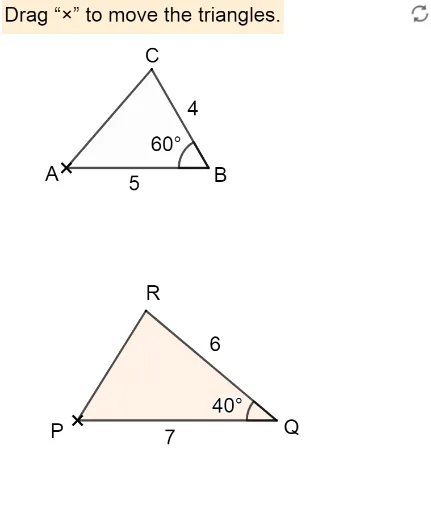
This GeoGebra example demonstrates how to dynamically construct a series of similar triangles using parametric controls and similarity transformations. The core mathematical concepts include similar triangles, similarity transformations (rotation, scaling, and translation), and proportional relationships. The construction uses commands such as Rotate, Angle, Polygon, Sequence, Point, Intersect, If, Segment, and Textfield. Key objects include angle variables (angleQ, β, θ), points (P, Q, A, B, C), segments (l1, t1, t2), circles (c, a, b), and interactive text/input boxes. This example is suitable for middle or high school geometry classes, helping students visualize the properties of similar triangles and explore dynamic geometric constructions with sliders and input fields.
GeoGebra Commands & Parameters
Rotate(B - (4, 0), (-(60°)), B) → CAngle(C, B, A) → βPolygon(A, B, C) → t1, c, a, bSequence(P + ((i * c), 0), i, 0.2, 3, 0.05) → l1Point(Ray[Rotate[P + (1, 0), ε, P], Rotate[P + (2, 0), ε, P]]) → R1Intersect(Ray[P, Rotate[P + (1, 0), ε, P]], Ray[Q, Rotate[Q - (1, 0), (-ζ), Q]]) → R_1Point(Ray[Rotate[Q - (1, 0), (-ζ), Q], Rotate[Q - (2, 0), (-ζ), Q]]) → R2If(Distance[R1, R_1] < δ, true, false) → close11If(Distance[R2, R_1] < δ, true, false) → close21Segment(P, Q) → rRotate(Q - (p, 0), (-ζ), Q) → RPolygon(P, Q, R) → t2, f, g, hSegment(P, R) → qSegment(Q, R) → p_2Angle(R, Q, P) → θTextfield(r') → InputBox1Textfield(p) → InputBox3Angle(B, A, C) → αAngle(A, C, B) → γAngle(Q, P, R) → ηAngle(P, R, Q) → ιSegment(P, Q) → iTextfield(angleQ) → InputBox2