
Longitude and Latitude
Loading the math board and drawing, please wait…
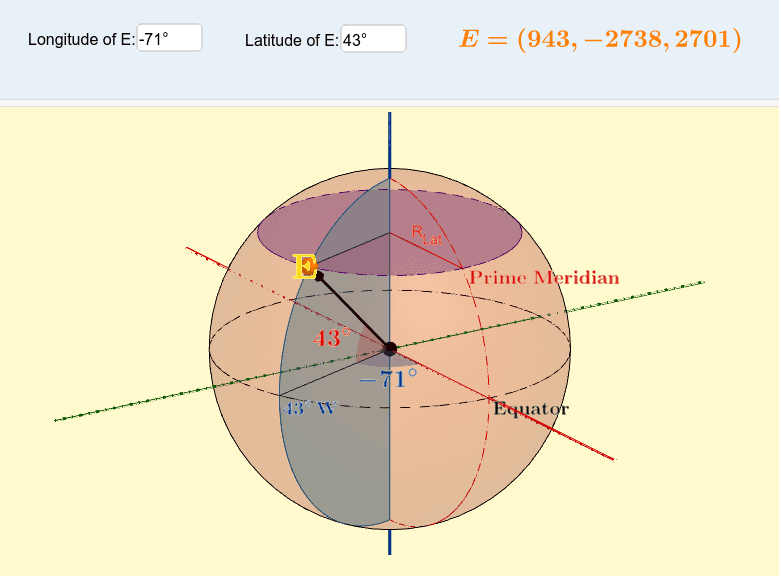
This example demonstrates the concepts of longitude and latitude on Earth. It involves coordinate geometry and geometric construction. Using GeoGebra commands such as Sphere, IntersectPath, and CornerThreeD, the example constructs the meridians and parallels on the Earth. Suitable for high school and above students to learn geography and mathematics.
GeoGebra Commands & Parameters
Sphere(O, A) → aIntersectPath(z = 0, a) → EquatorCornerThreeD(-1, 11) → NLine(O, N) → fOrthogonalPlane(O, f) → bIntersectPath(b, a) → dCircle(zAxis, C) → eSegment(B, C) → R_{Lat}CircumcircleArc(D, E, F) → gCircumcircleArc(D, A, F) → hIntersect(Equator, g, 2) → GLine(F, D) → iSegment(B, D) → jCircumcircleArc(D, H, F) → kCircumcircleSector(D, E, F) → pSegment(B, E) → lIntersect(Equator, p, 2) → ISegment(O, G) → mSegment(O, A) → nAngle(A, O, G) → αSegment(J, O) → OJAngle(H, O, J) → βAngle(E, O, G) → γSegment(O, P) → OPSegment(O, E) → qLine((0, 0, 0), (R_E, 0, 0)) → rLine((0, 0, 0), (0, R_E, 0)) → sSegment((0, 0, 0), (0, R_E, 0)) → tSegment((0, 0, 0), (0, (-R_E), 0)) → cSegment((0, 0, 0), ((-R_E), 0, 0)) → f_1Vector(O, E) → uTextfield(Long) → InputBox1Textfield(Lat) → InputBox2