
Logo YÌQI
Loading the math board and drawing, please wait…
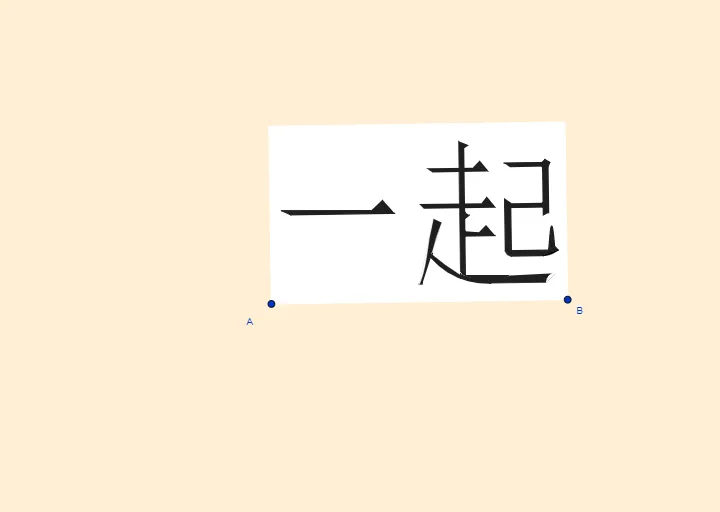
This example demonstrates the geometric construction of a logo named YÌQI. Key mathematical concepts include vectors and geometric construction. Using GeoGebra commands such as Line, OrthogonalLine, Vector, etc., it shows how to construct complex geometric shapes. Suitable for high school mathematics education and learning.
GeoGebra Commands & Parameters
Line(A, B) → sOrthogonalLine(A, s) → bVector(A, B) → uOrthogonalVector(u) → vOrthogonalLine(F, b) → fLineBisector(A_1, A) → lMirror(f, l) → f'_1Intersect(b, l) → GLine(H, l) → hOrthogonalLine(D, s) → iLineBisector(A, B) → nIntersect(n, f'_1) → V_1OrthogonalLine(J_1, f'_1) → g_1Intersect(n, f) → PMirror(i, n) → i'Intersect(i', f) → NLineBisector(F_1, D_1) → pIntersect(p, h) → H_1CircleArc(H_1, F_1, D_1) → dIntersect(d, g_1) → B_4,LineBisector(G_1, E_1) → kIntersect(k, h) → I_1CircleArc(I_1, G_1, E_1) → eIntersect(e, g_1) → M_1,OrthogonalLine(R_1, b) → g_2OrthogonalLine(L_1, f'_1) → h_1Intersect(e, h_1) → O_1,LineBisector(O_1, E_1) → f_2Intersect(i, f) → ZMirror(f, l) → f'Intersect(i, f') → EOrthogonalLine(A_1, b) → rOrthogonalLine(K, l) → jOrthogonalLine(B, u, xOyPlane) → gIntersect(g, r) → CMirror(F, l) → F'Polygon(A_1, C, B, A) → c4, a_1, c_3, b_2, a_2Mirror(E, n) → E'Intersect(i, h) → JIntersect(j, l) → LPolygon(I, L, J, O, M) → poly1, i_1, l_1, j_1, o, mCurveCartesian(((1 - t)^(3) * P) + (((3 * (1 - t)^(2)) * t) * T) + (((3 * (1 - t)) * t^(2)) * U) + (t^(3) * R), t, 0, 1) → aLineBisector(V, W) → qIntersect(q, f) → K_1CircleArc(K_1, W, V) → tPolygon(D_1, V, W, E_1) → q1, d_1, v_1, w, f_1Polygon(F_1, G_1, M_1, B_4) → t1, q_1, r_1, s_1, h_5Polygon(J_1, N_1, P_1, O_1, M_1) → poly2, k_1, n_1, p_1, o_1, m_1Intersect(f_2, g_2) → Q_1Polygon(O_1, D_1, E_1) → t2, t_1, b_1, c_1CircleArc(Q_1, O_1, E_1) → c_2Polygon(S_1, T_1, W_1, U_1, Z_1) → poly3, h_2, i_2, w_1, u_1, z_1OrthogonalLine(A_2, b) → j_2Intersect(n, j_2) → B_2Polygon(E_2, F_2, G_2, H_2, D_2) → poly4, k_2, l_2, m_2, n_2, d_2OrthogonalLine(C_2, b) → p_2Intersect(p_2, h_1) → I_2Polygon(M_2, I_2, J_2, K_2, L_2) → poly5, q_2, r_2, s_2, t_2, f_3Polygon(R, S, Q, P) → q2, r_3, s_3, q_3, p_3LineBisector(S, G_1) → g_3Intersect(s, g_3) → N_2CircleArc(N_2, S, G_1) → d_3OrthogonalLine(O_2, b) → h_3OrthogonalLine(Q_2, j_2) → i_3OrthogonalLine(R_2, j_2) → j_3OrthogonalLine(S_2, h) → k_3OrthogonalLine(T_2, j_2) → l_3OrthogonalLine(U_2, g_1) → m_3Intersect(i_3, j_2) → V_2Intersect(k_3, j_2) → Z_2Polygon(W_2, Z_2, R_2, B_3, A_3, C_3) → poly6, w_2, z_2, n_3, b_3, t_3, e_3Intersect(l_3, h) → E_3Polygon(T_2, R_2, D_3, F_3) → q3, f_4, g_4, h_4, i_4Polygon(G_3, I_3, Q_2, E_3, H_3) → poly7, j_4, k_4, l_4, m_4, n_4Intersect(i_3, m_3) → J_3Intersect(k_3, h_3) → K_3Intersect(h_3, l_3) → L_3Intersect(j_3, m_3) → N_3Intersect(k_3, m_3) → P_3Polygon(Q_2, J_3, K_3, L_3, M_3, O_3, N_3, P_3, S_2) → poly8, p_4, q_4, r_4, s_4, t_4, o_3, a_4, b_4, c_4LineBisector(J_3, K_3) → d_4Intersect(d_4, k_3) → R_3CircleArc(R_3, J_3, K_3) → e_4LineBisector(L_3, M_3) → f_5Intersect(f_5, l_3) → S_3CircleArc(S_3, L_3, M_3) → c_5CurveCartesian(((1 - t)^(4) * Q_3) + (((4 * (1 - t)^(3)) * t) * U_3) + (((6 * (1 - t)^(2)) * t^(2)) * W_3) + (((4 * (1 - t)) * t^(3)) * T_3) + (t^(4) * O_3), t, 0, 1) → cIntersect(h_1, l) → V_3Polygon(V_3, Z_3, A_4) → t3, g_5, v_3, z_3LineBisector(M_1, G_1) → i_5Intersect(i_5, g) → C_4CircleArc(C_4, G_1, M_1, xOyPlane) → d_5
AI Drawing Prompt Reference
Draw a geometric logo named YÌQI, demonstrating vectors and geometric construction. Start with a line segment and create its perpendicular line. Use vector construction and perpendicular lines to generate multiple geometric elements, including line segments, arcs, and intersection points. Combine these elements through mirroring, bisecting, and reflecting to form a complex geometric shape. The final image should include multiple polygons and curves, showcasing the mathematical concepts of vectors and geometric construction.
The prompt above was compiled from the original drawing commands and is for reference only.