
Locus of an Ellipse Guided by Two Tangent Circles
Loading the math board and drawing, please wait…
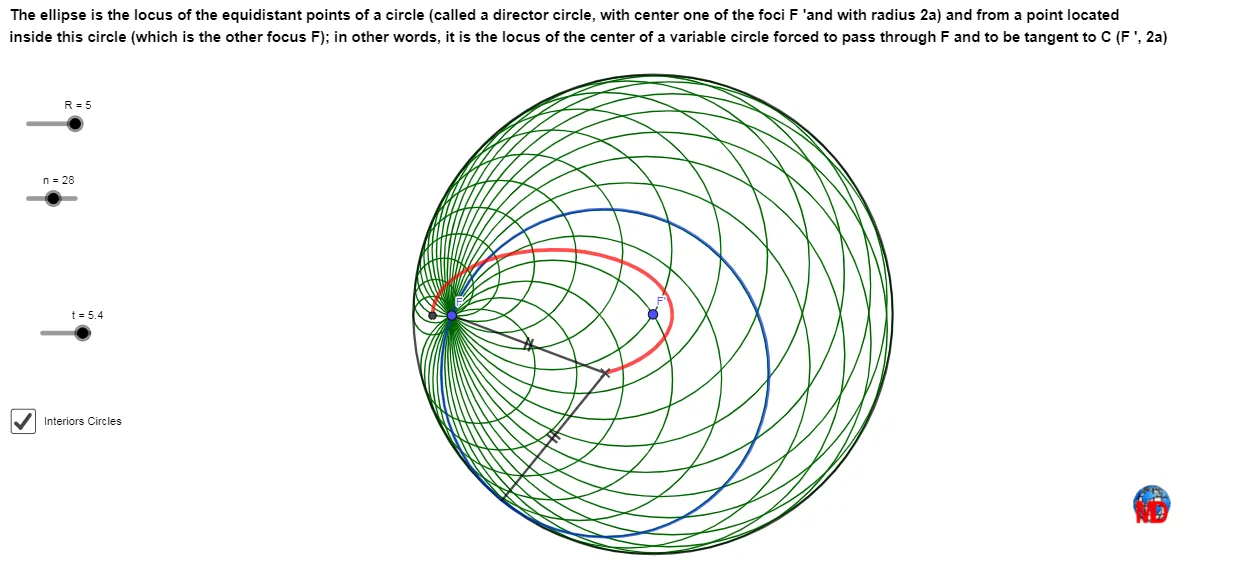
This example demonstrates how, under the constraint of two tangent circles, a moving construction leads to a locus that matches an ellipse-like trace. It combines circle tangency and symmetry with classical locus reasoning: as certain points are defined via tangents, angle bisectors, and orthogonal relations, their motion traces an elliptical curve. Key concepts include geometric characterization of an ellipse, circle tangency (tangent line conditions), symmetry (e.g., bisectors and equal-distance relationships), and the locus method for deriving curves from constraints. Construction highlights in GeoGebra: Ray and Circle to define rays and circles; Intersect to find key intersection points; Rotate and LineBisector to set symmetric/rotated configurations; Tangent and OrthogonalLine to enforce tangency and perpendicular relations; Line, Segment, Midpoint, Distance, Arc, and Vector for geometric measures and supporting constructions; Ellipse as a reference object and Locus plus Sequence to generate the traced curve from the evolving point set. Suitable for secondary school geometry, contest preparation, and anyone learning geometric construction and curve tracing.
GeoGebra Commands & Parameters
Ray(F', F) → qCircle(F', R) → cIntersect(c, q) → B,Rotate(B, (-t), F') → B'LineBisector(B', F) → fTangent(B', c) → g,OrthogonalLine(B', g) → hIntersect(f, h) → DCircle(D, B') → dLocus(D, t) → lieu1Segment(B', D) → iSegment(D, F) → jSequence(Rotate[B, (-i), F'], i, 0, (2 * π), (2 * π / n)) → l1Segment(F', F) → kLine(F, F') → lEllipse(F, F', D) → eIntersect(e, l) → E, F_1Midpoint(E, F_1) → GOrthogonalLine(G, l) → mIntersect(e, m) → H, IDistance(F_1, G) → aDistance(G, H) → bArc(e, D, E) → pVector(G, F_1) → uVector(G, I) → vSequence(G - (cos(i) * u) + (sin(i) * v), i, 0, t, (2 * π / n)) → l3Sequence(Circle[Element[l3, i], F], i, 1, n) → l4
AI Drawing Prompt Reference
Construct an ellipse trajectory guided by two tangent circles. Key objects include two tangent circles, an ellipse, trajectory points, angle bisectors, and perpendicular lines. The construction order is: define rays and circles, find intersection points, rotate points, draw angle bisectors, use tangents and perpendicular lines to determine trajectory points, then generate the ellipse and trajectory.
The prompt above was compiled from the original drawing commands and is for reference only.