
Lissajous Curves on a Sphere
Loading the math board and drawing, please wait…
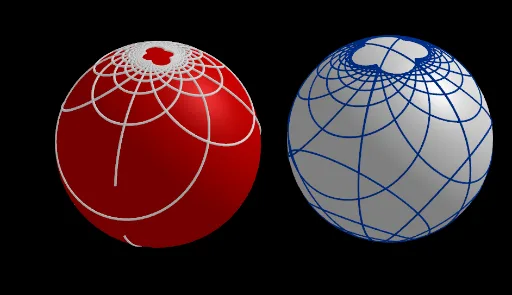
This example demonstrates how Lissajous curves can be mapped onto a sphere, creating intricate and elegant spatial patterns. The core mathematical concepts include parametric equations, 3D curves, spherical geometry, and the influence of frequency ratios and phase differences on the curve's shape. Construction highlights: using GeoGebra's CurveCartesian command to define parametric curves, Sphere to create the sphere, and Line, Mirror, Circle to build symmetric elements; objects include points, functions, and curves such as h, O, a_1, f_1, etc. By adjusting sliders, users can observe dynamic changes of the curve on the sphere. Suitable for high school or university mathematics, helping to understand parametric curves, 3D geometry, and the aesthetic intersection of math and art.
GeoGebra Commands & Parameters
CurveCartesian(x(O) + (2 * f(t) / (1 + f(t)^(2) + g(t)^(2))), y(O) + (2 * g(t) / (1 + f(t)^(2) + g(t)^(2))), z(O) + (-1 + f(t)^(2) + g(t)^(2)) / (1 + f(t)^(2) + g(t)^(2)), t, 0, 6.28319) → cp3Sphere(O, 1) → aCurveCartesian(x(A) + (2 * f1(t) / (1 + f1(t)^(2) + g1(t)^(2))), y(A) + (2 * g1(t) / (1 + f1(t)^(2) + g1(t)^(2))), z(A) + (-1 + f1(t)^(2) + g1(t)^(2)) / (1 + f1(t)^(2) + g1(t)^(2)), t, 0, 6.28319) → cpASphere(A, 1) → cLine(A, zAxis) → iMirror(cpA, i) → cpA'Mirror(cp3, O) → cp3'CurveCartesian(f1(t), g1(t), t, 0, 6.28319) → cp2Circle(O, sqrt(a_1^(2) + a_2^(2)), xOyPlane) → d
AI Drawing Prompt Reference
Draw a unit sphere centered at the origin. On its surface, generate a Lissajous curve defined by two parametric functions, mapped onto the sphere via stereographic projection, creating an intricate spatial pattern. Create a second unit sphere centered at another point, with a similar curve on it. Reflect this second curve across a line through its center parallel to the vertical axis, and reflect the first curve through the origin. Additionally, draw a circle in the horizontal plane with radius determined by two parameters. The overall composition shows symmetry and dynamic geometric beauty, adjustable via parameters.
The prompt above was compiled from the original drawing commands and is for reference only.