
Linear Function Modeling Quiz
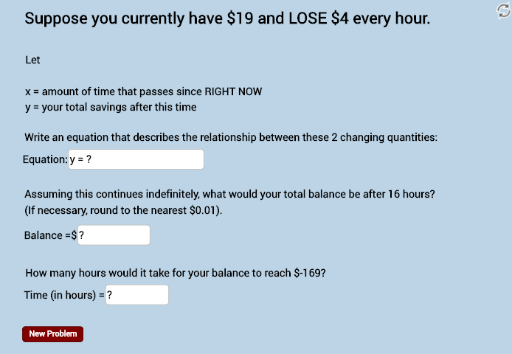
Loading the math board and drawing, please wait…
In collections
Writing Linear Equations
This example demonstrates how to apply linear function models to real-world contexts and use these models to answer questions about each situation. The core math concepts involved include linear equations and functions. Construction highlights: GeoGebra commands used are Union (union), Sequence (sequence), RandomElement (random element), FractionText (fraction text), Denominator (denominator), Textfield (text field); objects include numlist (number list), denomlist (denominator list), blist (boolean list), n (number), s (sequence), b (boolean), button1 (button), text1 (text1), dollar (currency symbol), a (number), text2 (text2), text4 (text4), text5 (text5), text3 (text3), f (function), g (function), text6 (text6), InputBox1 (input box1), text7 (text7), kseq (sequence), k (number), numb (number), d (number), ans (answer), InputBox2 (input box2), text7_1 (text7_1), deonm2list (denominator list), chosenans (chosen answer), FINAL (final), text9 (text9), e (number), InputBox3 (input box3), text7_2 (text7_2), text8 (text8), text10 (text10), text3_1 (text3_1). Suitable for middle school and above students for mathematics teaching and practice.
GeoGebra Commands & Parameters
Union(Sequence[-20, -1], Sequence[1, 20]) → numlistSequence(1, 10) → denomlistSequence(-20, 20) → blistSequence(11, 50) → nRandomElement(blist) → bFractionText(s) → text1Denominator(s) → aTextfield(g) → InputBox1Sequence(i, i, 1, 20, 1) → kseqRandomElement(kseq) → kTextfield(d) → InputBox2Sequence((a * i), i, 5, 75, 1) → deonm2listRandomElement(deonm2list) → chosenansTextfield(e) → InputBox3