
Line and Circle Intersection by David T (2)
Loading the math board and drawing, please wait…
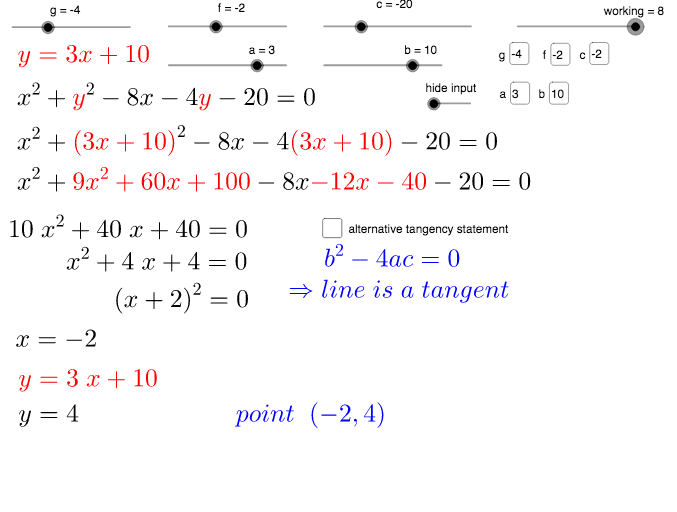
This example demonstrates the intersection points between a line and a circle. It involves core mathematical concepts such as coordinate geometry, equation solving, and geometric construction. Key GeoGebra commands and objects used in the construction include Simplify, Coefficients, GCD, Expand, Factor, Root, FractionText, Circle, Line, OrthogonalLine, Distance, Intersect, and Textfield. It is suitable for high school students learning coordinate geometry or for educational demonstrations.
GeoGebra Commands & Parameters
Simplify(h) → eCoefficients(e) → list1GCD(list1) → cfSimplify(e(x) / cf) → pExpand(w(x)^(2)) → vExpand(((2 * f) * w(x))) → dFactor(p) → iRoot(i) → A, BFractionText(x(A)) → R_1FractionText(x(B)) → R_2Circle(C, r^(0.5)) → kLine(D, E) → jOrthogonalLine(C, j) → lDistance(C, j) → distIntersect(w, k) → F, F_2Textfield(a) → inputBox1_1Textfield(b) → inputBox1Textfield(g) → inputBox2Textfield(f) → inputBox3Textfield(c) → inputBox4
AI Drawing Prompt Reference
Draw a line and a circle, and mark their intersection points. First, simplify an equation and extract its coefficients and greatest common divisor to derive the line equation. Then, plot the circle and the line, and find the perpendicular line from the circle's center to the line. Calculate the distance from the circle's center to the line and determine the intersection points. Finally, display key coordinates and equations in text boxes.
The prompt above was compiled from the original drawing commands and is for reference only.