
Binomial Square Demonstration
Loading the math board and drawing, please wait…
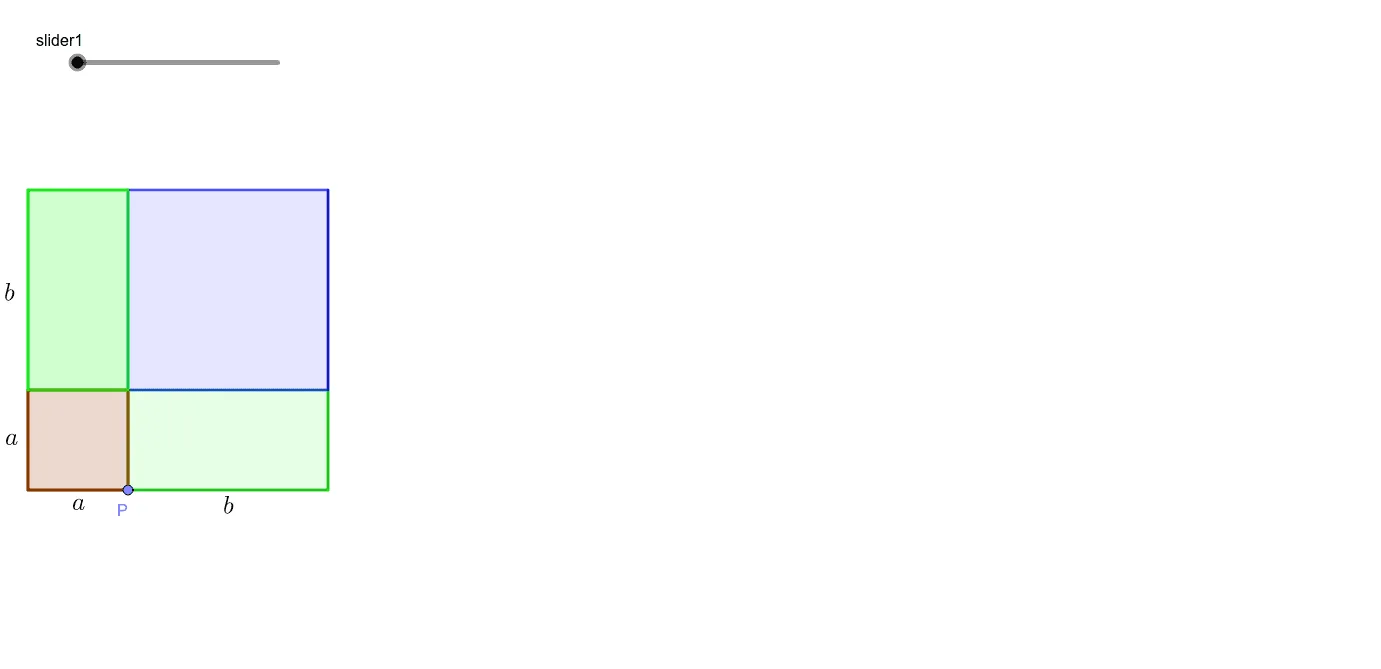
This example geometrically visualizes the square of a binomial (a+b)², demonstrating its expansion through dynamic constructions. Key math concepts include algebraic expansion, geometric figure construction, and coordinate geometry. GeoGebra commands and objects used are Intersect, Ray, Point, Circle, OrthogonalLine, Line, Segment, Polygon, Midpoint, LineBisector, and Rotate. Suitable for high school students and teachers to explore the connection between algebra and geometry, enhancing spatial reasoning skills.
GeoGebra Commands & Parameters
Intersect(xAxis, yAxis) → ARay(A, B) → fPoint(f) → CCircle(A, C) → cOrthogonalLine(A, f) → gIntersect(c, g, 2) → DLine(D, f) → hLine(C, g) → iIntersect(h, i) → ESegment(A, C) → jSegment(E, C) → kSegment(E, D) → lSegment(D, A) → mPoint(j) → PCircle(A, P) → dIntersect(d, m, 1) → HOrthogonalLine(P, j) → nOrthogonalLine(H, m) → pIntersect(n, p) → IIntersect(n, l) → JIntersect(p, k) → KPolygon(H, I, P, A) → q1, h_1, i_1, g_1, aPolygon(J, I, H, D) → q2, j_1, i_2, h_2, d_1Polygon(I, K, C, P) → q3, i_3, k_1, c_1, g_2Polygon(J, E, K, I) → q4, j_2, e, k_2, i_4Segment(H, L) → qIntersect(r, s) → MIntersect(r, s) → OMidpoint(D, H) → I_1Midpoint(H, A) → G_1Midpoint(A, P) → H_1Midpoint(P, C) → J_1Segment(H, L) → tIntersect(b, t) → FPolygon(G, F, 4) → poly1, l_1, m_1, n_1, p_1, N, QSegment(I, R) → q_1Intersect(r_1, q_1) → SPolygon(S, T, V, U) → q5, s_1, t_1, v, uSegment(W, H) → a_1Segment(Z, D) → b_1LineBisector(b_1) → e_1LineBisector(a_1) → f_2Intersect(e_1, f_2) → A_1Rotate(J, (-slider3), A_1) → J'Rotate(I, (-slider3), A_1) → I'Rotate(H, (-slider3), A_1) → H'Rotate(D, (-slider3), A_1) → D'Polygon(J', I', H', D') → q2', j', i', h', d'Polygon(E_1, D_1, 4) → poly2, m_2, n_2, p_2, q_2, C_1, F_1Midpoint(D, H) → K_1Midpoint(m_1) → L_1Midpoint(n_1) → P_1Midpoint(G, N) → Q_1Midpoint(U, V) → N_1Midpoint(R, U) → S_1Midpoint(J', I') → R_1Midpoint(T, U) → T_1Midpoint(H', J') → U_1Intersect(n_2, p_2) → M_1Midpoint(E_1, M_1) → O_1Intersect(p_2, q_2) → V_1Midpoint(M_1, V_1) → W_1Midpoint(D_1, M_1) → Z_1
AI Drawing Prompt Reference
Draw a geometric diagram to demonstrate the square of a binomial (a+b)² through dynamic constructions, showing its expansion. Start by drawing coordinate axes and finding their intersection point. Then draw a ray from the intersection point, take a point on the ray, and draw a circle centered at the intersection point with the radius equal to the distance to the point on the ray. Next, draw the perpendicular line from the intersection point to the ray and the circle, and find their intersection points. Connect these points to form lines, and then connect these lines to form four triangles. Finally, rotate one of the triangles to show the geometric meaning of the binomial square.
The prompt above was compiled from the original drawing commands and is for reference only.