
Learn How to Use Rotation
Loading the math board and drawing, please wait…
In collections
Transformations and triangle congruence
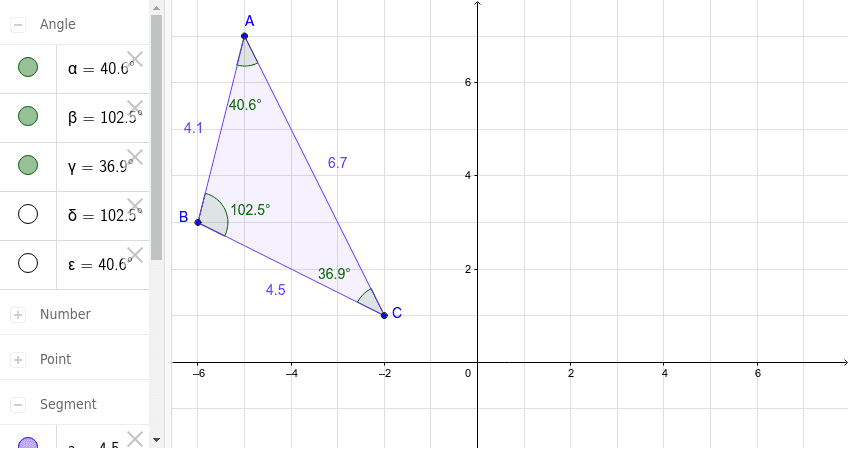
This example demonstrates how to use rotation transformation to construct geometric figures, involving core mathematical concepts such as rotation, polygon, angle, and distance. Construction highlights include using commands and objects like Polygon, Intersect, Segment, Angle, Distance, Point in GeoGebra. Suitable for middle school students and above to learn and understand the properties and applications of geometric transformations.
GeoGebra Commands & Parameters
Polygon(A, B, C) → poly1, c, a, bIntersect(xAxis, yAxis) → D_1Segment(E, D) → dSegment(E, H) → eSegment(D, H) → fAngle(B, A, C) → αAngle(C, B, A) → βAngle(A, C, B) → γDistance(b, c) → gDistance(d, a) → hAngle(H, E, D) → δAngle(E, D, H) → εPoint(e) → E_1Point(f) → G
AI Drawing Prompt Reference
Draw a triangle ABC, then rotate it around point A to create a new triangle A'B'C'. Use the Polygon tool to draw triangle ABC, find the intersection point D of the x-axis and y-axis, draw line segments DE and DH, measure the angles BAC, BCA, and CAB, and finally calculate the lengths of line segments BC and AD.
The prompt above was compiled from the original drawing commands and is for reference only.