
Learning Geometric Translation: Polygon and Segment Transformation
Loading the math board and drawing, please wait…
In collections
Transformations and triangle congruence
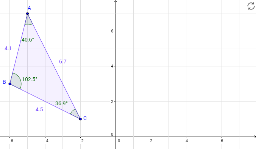
This GeoGebra example demonstrates the geometric translation transformation of figures within a plane. Key mathematical concepts involved are translation, vectors, angles, and distance measurement. The construction utilizes specific GeoGebra commands including Polygon, Segment, Angle, Distance, and Point to define vertices A, B, C and polygon poly1, ensuring precise movement. It is designed for middle and high school students to visualize and understand plane geometry transformations effectively.
GeoGebra Commands & Parameters
Polygon(A, B, C) → poly1, c, a, bIntersect(xAxis, yAxis) → D_1Segment(E, D) → dSegment(E, H) → eSegment(D, H) → fAngle(B, A, C) → αAngle(C, B, A) → βAngle(A, C, B) → γDistance(b, c) → gDistance(d, a) → hAngle(H, E, D) → δAngle(E, D, H) → εPoint(e) → E_1Point(f) → G
AI Drawing Prompt Reference
Draw a geometric transformation example on a plane featuring a polygon and a segment, demonstrating their translation via a vector. Start by sketching a triangle, then draw a line segment from the origin to the starting point of the translation vector, and construct the translated triangle from this point. Measure and label the side lengths, angles of both the original and new triangles, and the length and angle of the translation vector to illustrate the concept of geometric translation.
The prompt above was compiled from the original drawing commands and is for reference only.