
Leap and Rebound of a Ball Simulation
Loading the math board and drawing, please wait…
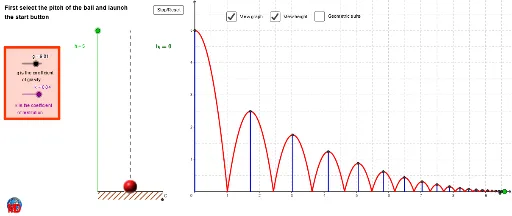
① This GeoGebra example dynamically simulates a ball leaping and rebounding under gravity, visually demonstrating motion trajectories and velocity changes. ② Core math concepts include function graphs, sequences (rebound series), linear equations (velocity changes), differential calculus (instantaneous velocity), and probability (random factors possibly affecting rebound heights), along with dilation and exponential decay of rebound heights. ③ Construction highlights: uses Vector for initial velocity, Intersect for collision points, If for rebound conditions, CurveCartesian for trajectory curves, Segment and Line for reference lines, Sequence for generating multiple rebounds, and Polygon for auxiliary shapes; objects include points (E, D, F), parameters (t, v, u), functions (k, h, g), and series rebound parameters (r1~r10, a1~a10, t1~t10). ④ Suitable for high school to early college students, ideal for physics-mathematics integrated kinematics teaching and for visually demonstrating derivative concepts in calculus.
GeoGebra Commands & Parameters
Vector((0, 1)) → vVector((1, 0)) → uIntersect(xAxis, yAxis) → OIf(t ≥ 0 ∧ t ≤ r1, ((k_1 * (t + r1)) * (t - r1)), 0) → a1If(t ≥ 0 ∧ t ≤ r1, t, 0) → t1If(t ≥ r1 ∧ t ≤ r2, ((k_1 * (t - r1)) * (t - r2)), 0) → a2If(t ≥ r1 ∧ t ≤ r2, t, 0) → t2If(t ≥ r2 ∧ t ≤ r3, ((k_1 * (t - r2)) * (t - r3)), 0) → a3If(t ≥ r2 ∧ t ≤ r3, t, 0) → t3If(t ≥ r3 ∧ t ≤ r4, ((k_1 * (t - r3)) * (t - r4)), 0) → a4If(t ≥ r3 ∧ t ≤ r4, t, 0) → t4If(t ≥ r4 ∧ t ≤ r5, ((k_1 * (t - r4)) * (t - r5)), 0) → a5If(t ≥ r4 ∧ t ≤ r5, t, 0) → t5If(t ≥ r5 ∧ t ≤ r6, ((k_1 * (t - r5)) * (t - r6)), 0) → a6If(t ≥ r5 ∧ t ≤ r6, t, 0) → t6If(t ≥ r6 ∧ t ≤ r7, ((k_1 * (t - r6)) * (t - r7)), 0) → a7If(t ≥ r6 ∧ t ≤ r7, t, 0) → t7If(t ≥ r7 ∧ t ≤ r8, ((k_1 * (t - r7)) * (t - r8)), 0) → a8If(t ≥ r7 ∧ t ≤ r8, t, 0) → t8If(t ≥ r8 ∧ t ≤ r9, ((k_1 * (t - r8)) * (t - r9)), 0) → a9If(t ≥ r8 ∧ t ≤ r9, t, 0) → t9If(t ≥ r9 ∧ t ≤ r10, ((k_1 * (t - r9)) * (t - r10)), 0) → a10If(t ≥ r9 ∧ t ≤ r10, t, 0) → t10If(t ≥ r10 ∧ t ≤ r11, ((k_1 * (t - r10)) * (t - r11)), 0) → a11If(t ≥ r10 ∧ t ≤ r11, t, 0) → t11If(t ≥ r11 ∧ t ≤ r12, ((k_1 * (t - r11)) * (t - r12)), 0) → a12If(t ≥ r11 ∧ t ≤ r12, t, 0) → t12If(t ≥ r13 ∧ t ≤ r14, ((k_1 * (t - r13)) * (t - r14)), 0) → a14If(t ≥ r13 ∧ t ≤ r14, t, 0) → t14If(t ≥ r14 ∧ t ≤ r15, ((k_1 * (t - r14)) * (t - r15)), 0) → a15If(t ≥ r14 ∧ t ≤ r15, t, 0) → t15If(t ≥ r15 ∧ t ≤ r16, ((k_1 * (t - r15)) * (t - r16)), 0) → a16If(t ≥ r15 ∧ t ≤ r16, t, 0) → t16If(t ≥ r16 ∧ t ≤ r17, ((k_1 * (t - r16)) * (t - r17)), 0) → a17If(t ≥ r16 ∧ t ≤ r17, t, 0) → t17If(t ≥ r17 ∧ t ≤ r18, ((k_1 * (t - r17)) * (t - r18)), 0) → a18If(t ≥ r17 ∧ t ≤ r18, t, 0) → t18If(t ≥ r18 ∧ t ≤ r19, ((k_1 * (t - r18)) * (t - r19)), 0) → a19If(t ≥ r18 ∧ t ≤ r19, t, 0) → t19If(t ≥ r19 ∧ t ≤ r20, ((k_1 * (t - r19)) * (t - r20)), 0) → a20If(t ≥ r19 ∧ t ≤ r20, t, 0) → t20If(t ≥ r12 ∧ t ≤ r13, ((k_1 * (t - r12)) * (t - r13)), 0) → a13If(t ≥ r12 ∧ t ≤ r13, t, 0) → t13CurveCartesian(s, ((k_1 * (s + r1)) * (s - r1)), s, 0, r1) → c1CurveCartesian(s, ((k_1 * (s - r1)) * (s - r2)), s, r1, r2) → c2CurveCartesian(s, ((k_1 * (s - r2)) * (s - r3)), s, r2, r3) → c3CurveCartesian(s, ((k_1 * (s - r3)) * (s - r4)), s, r3, r4) → c4CurveCartesian(s, ((k_1 * (s - r4)) * (s - r5)), s, r4, r5) → c5CurveCartesian(s, ((k_1 * (s - r5)) * (s - r6)), s, r5, r6) → c6CurveCartesian(s, ((k_1 * (s - r6)) * (s - r7)), s, r6, r7) → c7CurveCartesian(s, ((k_1 * (s - r7)) * (s - r8)), s, r7, r8) → c8CurveCartesian(s, ((k_1 * (s - r8)) * (s - r9)), s, r8, r9) → c9CurveCartesian(s, ((k_1 * (s - r9)) * (s - r10)), s, r9, r10) → c10CurveCartesian(s, ((k_1 * (s - r10)) * (s - r11)), s, r10, r11) → c11CurveCartesian(s, ((k_1 * (s - r11)) * (s - r12)), s, r11, r12) → c12CurveCartesian(s, ((k_1 * (s - r12)) * (s - r13)), s, r12, r13) → c13If(t ≤ r20, P1, P2) → PCurveCartesian(s, ((k_1 * (s - r13)) * (s - r14)), s, r13, r14) → c14CurveCartesian(s, ((k_1 * (s - r14)) * (s - r15)), s, r14, r15) → c15CurveCartesian(s, ((k_1 * (s - r15)) * (s - r16)), s, r15, r16) → c16CurveCartesian(s, ((k_1 * (s - r16)) * (s - r17)), s, r16, r17) → c17CurveCartesian(s, ((k_1 * (s - r17)) * (s - r18)), s, r17, r18) → c18CurveCartesian(s, ((k_1 * (s - r18)) * (s - r19)), s, r18, r19) → c19CurveCartesian(s, ((k_1 * (s - r19)) * (s - r20)), s, r19, r20) → c20Segment(AA, (-1, 0)) → cSegment((-2, 0), (-2, h)) → dLine((0, h), c) → eIntersect(e, d) → ASequence(AA + (i / 5 * Vector[AA, BB]), i, 0, 5) → liste1Polygon(B, C, BB, AA) → poly1, i, j, l, mPolygon(D, E, F, G) → poly2, d_1, e_1, f_1, g_1Segment(D1, (0, F1)) → G1Segment(D2, F2) → G2Segment(D3, F3) → G3Segment(D4, F4) → G4Segment(D5, F5) → G5Segment(D6, F6) → G6Segment(D7, F7) → G7Segment(D8, F8) → G8Segment(D9, F9) → G9Segment(D10, F10) → G10Segment(D11, F11) → G11Segment(D12, F12) → G12Segment(D13, F13) → G13Segment(D14, F14) → G14Segment(D15, F15) → G15Segment(D16, F16) → G16Segment(D17, F17) → G17Segment(D18, F18) → G18Segment(D19, F19) → G19Segment(D20, F20) → G20Segment(H1, H2) → I1Segment(H2, H3) → I2Segment(H3, H4) → I3Segment(H4, H5) → I4Segment(H5, H6) → I5Segment(H6, H7) → I6Segment(H7, H8) → I7Segment(H8, H9) → I8Segment(H9, H10) → I9Segment(H10, H11) → I10Segment(H11, H12) → I11Segment(H12, H13) → I12Segment(H13, H14) → I13Segment(H14, H15) → I14Segment(H15, H16) → I15Segment(H16, H17) → I16Segment(H17, H18) → I17Segment(H18, H19) → I18Segment(H19, H20) → I19Sequence(Text[If[i ≟ 2, "ar", "ar^{" + (i - 1) + "}"], Element[liste2, i] + (-0.2, 0.4), true, true], i, 1, Length[liste2] - 10) → liste3
AI Drawing Prompt Reference
Create a dynamic simulation of a ball leaping and rebounding under gravity, showing motion trajectories and velocity changes. Include initial velocity vectors, the intersection point of coordinate axes, multiple trajectories with decreasing rebound heights, reference lines, and auxiliary shapes for multiple rebounds. Use parameters to control the ball's motion, function graphs to illustrate velocity changes, and a sequence to generate successive rebounds, suitable for demonstrating calculus concepts like derivatives.
The prompt above was compiled from the original drawing commands and is for reference only.