
Law of Sines Visualization: Dynamic Triangle Exploration
Loading the math board and drawing, please wait…
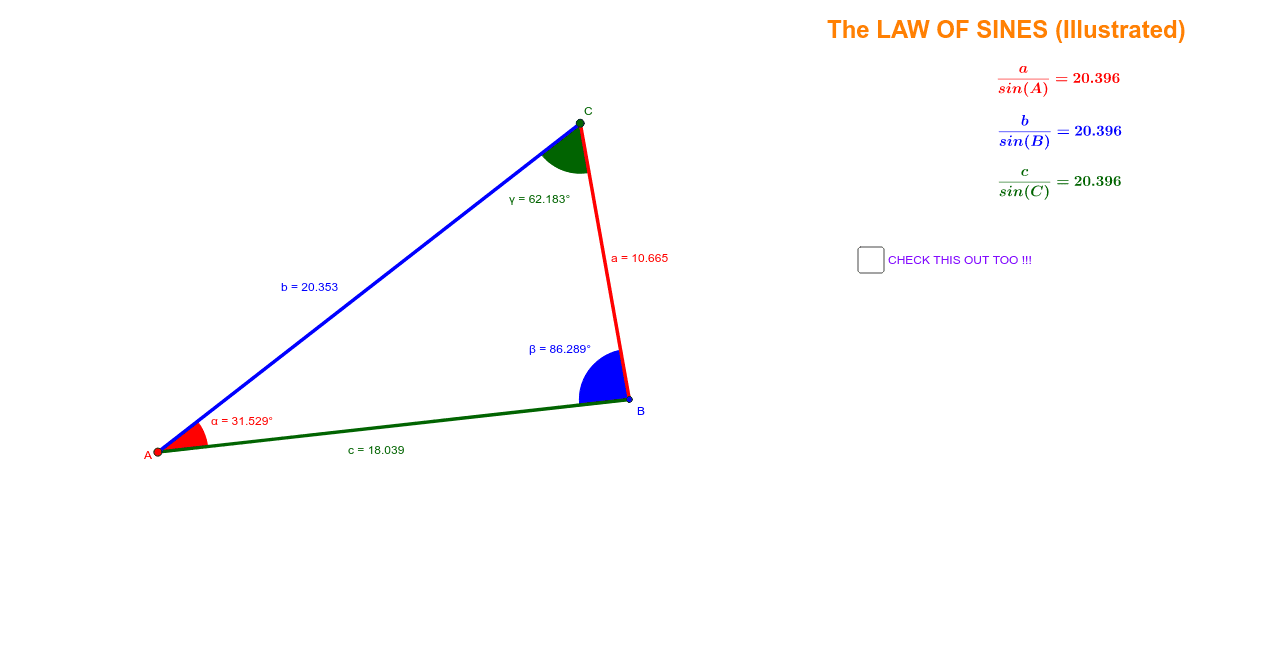
This applet demonstrates the geometric meaning of the Law of Sines — in any triangle, the ratio of any side length to the sine of its opposite angle is constant (a/sin A = b/sin B = c/sin C). Through a draggable dynamic triangle, students can intuitively observe the constant relationship between side lengths and sines of opposite angles. Core mathematical concepts include the Law of Sines, triangle angle sum, and trigonometric ratios. Construction highlights: Using Segment command to construct sides AB=c, BC=a, AC=b; Angle command to mark interior angles α, β, γ; Circle command to draw circumcircle; Intersect command to determine points on circle; OrthogonalLine to construct altitudes and verify orthocenter properties. Suitable for middle school to high school mathematics teaching, theorem exploration in trigonometry chapters, geometric construction demonstration, or inquiry-based learning activities.
GeoGebra Commands & Parameters
Segment(A, B) → cSegment(B, C) → aSegment(C, A) → bAngle(A, C, B) → γAngle(B, A, C) → αAngle(C, B, A) → βMidpoint(c) → D_1Midpoint(b) → E_1OrthogonalLine(E_1, b) → dOrthogonalLine(D_1, c) → eIntersect(d, e) → GCircle(G, B) → fPoint(f) → DLine(D, G) → gIntersect(f, g, 2) → ESegment(D, E) → h
AI Drawing Prompt Reference
Draw a dynamic triangle to visualize the Law of Sines. The figure includes sides AB, BC, AC, and interior angles α, β, γ. A circle is drawn with center at the intersection G of two perpendicular lines. The circle passes through point B and point D on the circle. Line g connects D and G, intersecting the circle at point E. Segment h connects D and E. The overall presentation shows the relationship between the triangle and the circle, illustrating the constant ratio of side lengths to sines of opposite angles.
The prompt above was compiled from the original drawing commands and is for reference only.