
Finding Angles with Trigonometric Ratios (GeoGebra Lesson)
Loading the math board and drawing, please wait…
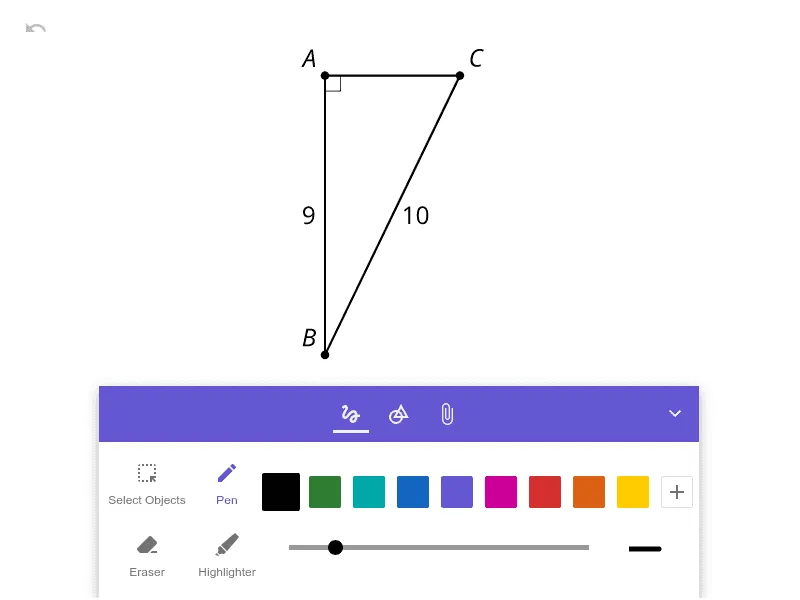
This example demonstrates how to compute an unknown angle in a geometric figure using trigonometric ratios such as sine, cosine, and tangent. The key concepts include the definitions of trig ratios, relationships in right triangles (or triangles reducible to them), and solving for angles from known side lengths via inverse trigonometric functions. Construction-wise, the workflow is to build the relevant triangle/angle configuration in GeoGebra, specify or constrain the known lengths, compute the appropriate trig ratio from the geometry, then apply the corresponding inverse trig function (e.g., arcsin/arccos/arctan) to obtain the angle value. Finally, the angle measure is displayed and visually cross-checked against the computed result. Suitable for middle school through early high school, and also useful for instructional demonstrations and practice on applying trigonometry to angle-finding problems.
AI Drawing Prompt Reference
Draw a right triangle with one acute angle highlighted, showing the known lengths of one leg and the hypotenuse. Mark the right angle with a small square. Label the known side lengths and indicate the unknown angle with a curved arrow. Beside the triangle, include a small reference diagram illustrating sine, cosine, and tangent as ratios of sides, with arrows pointing to the relevant sides. Finally, display the computed angle measure in degrees near the angle, along with a brief note like 'using inverse sine' or 'using inverse cosine'. Keep the layout clean and instructional for classroom use.
The prompt above was compiled from the original drawing commands and is for reference only.