
Adjacent and Non-Adjacent Angles: Concepts and Geometric Construction
Loading the math board and drawing, please wait…
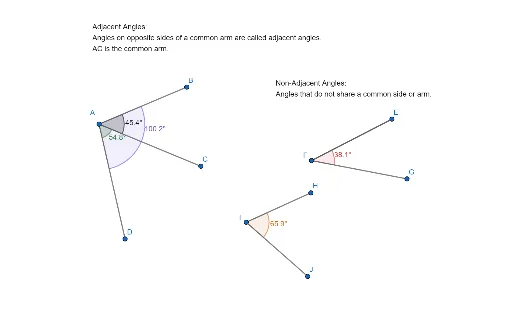
This GeoGebra example demonstrates and distinguishes between adjacent angles (angles that share a common side/vertex) and non-adjacent angles (angles that do not share sides) in geometry. Using GeoGebra commands: Segment to draw points A, B, C, D, E, F forming multiple rays and line segments, and Angle command to create angle objects α, β, γ, δ, ε, etc., visually showing the relationship when two angles share a common arm versus when they do not. This example is suitable for middle school mathematics geometry teaching, helping students understand angle classification and properties, master basic geometric construction skills, and serves as a practical tool for angle concept instruction, geometric reasoning training, and classroom demonstration.
GeoGebra Commands & Parameters
Segment(A, B) → fSegment(A, C) → gSegment(A, D) → hAngle(B, A, C) → αAngle(C, A, D) → βAngle(B, A, D) → γSegment(E, F) → iSegment(F, G) → jSegment(H, I) → kSegment(I, J) → lSegment(E, F) → mSegment(F, E) → nAngle(E, F, G) → δAngle(H, I, J) → ε
AI Drawing Prompt Reference
Draw two intersecting lines to form four angles, label two adjacent angles and one non-adjacent angle, then draw two parallel lines to create corresponding, alternate interior, and consecutive interior angles, highlighting their relationships with different colors.
The prompt above was compiled from the original drawing commands and is for reference only.