
Right Triangle Solver: Formative Assessment Tool
Loading the math board and drawing, please wait…
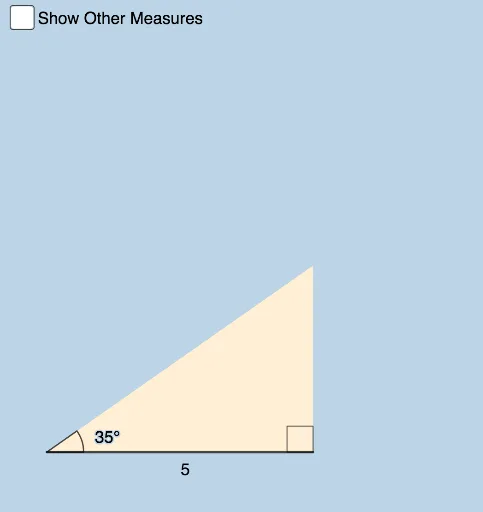
This interactive GeoGebra example demonstrates how to construct a right triangle solver for formative assessment. Users input known side lengths or angles, and the tool automatically calculates unknown elements using trigonometric relationships (sine, cosine, tangent). Construction highlights: Rotate command for reference rays, Intersect for vertex positioning, Angle tools for α, β, γ annotations, OrthogonalLine for perpendicular sides, Polygon for triangle rendering, Segment for sides a, b, c, Circle for geometric verification, and Textfield for parameter input. Ideal for middle to high school mathematics, serving both as a visual aid for teaching trigonometric concepts and as a self-directed learning resource for exploring right triangle relationships.
GeoGebra Commands & Parameters
Rotate(B, α, A) → B'Ray(A, B') → gIntersect(f, g) → CAngle(B, A, B') → βIntersect(g, k) → DOrthogonalLine(D, k) → lIntersect(l, xAxis) → EPolygon(A, B, C) → t1, c_1, a_1, b_1Segment(A, B) → mSegment(B, C) → nSegment(C, A) → pAngle(t1) → γ, δ, εPolygon(A, E, D) → t2, d_1, a_2, e_1Segment(E, D) → qSegment(E, A) → rSegment(A, D) → sAngle(t2) → ζ, η, θCircle(A, a) → tIntersect(t, g, 1) → FOrthogonalLine(F, xAxis) → f_1Intersect(f_1, xAxis) → GPolygon(A, G, F) → t3, f_2, a_3, g_1Segment(A, F) → h_1Segment(F, G) → i_1Segment(G, A) → j_1Angle(t3) → ι, κ, λOrthogonalLine(B, xAxis) → k_1Circle(B, sqrt(u^(2) - a^(2))) → p_1Intersect(p_1, k_1, 2) → HSegment(A, H) → l_1Polygon(A, B, H) → t4, h_2, a_4, b_2Segment(B, H) → m_1Angle(t4) → μ, ν, ξCircle(A, u) → q_1Intersect(q_1, n_1, 2) → IOrthogonalLine(I, n_1) → r_1Intersect(r_1, xAxis) → JPolygon(A, J, I) → t5, i_2, a_5, j_2Segment(A, J) → s_1Segment(J, I) → t_1Segment(I, A) → g_2Angle(t5) → ο, ρ, σPolygon(A, B, K) → t6, k_2, a_6, b_3Angle(t6) → τ, υ, ϕSegment(B, K) → l_2Segment(K, A) → m_2Textfield(a) → InputBox1Textfield(α) → InputBox2Textfield(u) → InputBox3Textfield(u) → InputBox4Textfield(a) → InputBox5
AI Drawing Prompt Reference
Draw a right triangle solver with multiple right triangles and auxiliary lines. Start by rotating a ray from a vertex to form a reference line, intersecting with another line to define a vertex, creating the first right triangle with its three angles labeled. Then, drop a perpendicular from that vertex to the horizontal axis, forming a second right triangle with angles marked. Next, draw a circle with the hypotenuse as radius, intersecting the reference line to construct a third right triangle. Subsequently, use the Pythagorean theorem to build a fourth right triangle, labeling its angles. Finally, add two input boxes for entering side length and angle values to dynamically solve unknown quantities.
The prompt above was compiled from the original drawing commands and is for reference only.