
Law of Sines and Triangle Construction
Loading the math board and drawing, please wait…
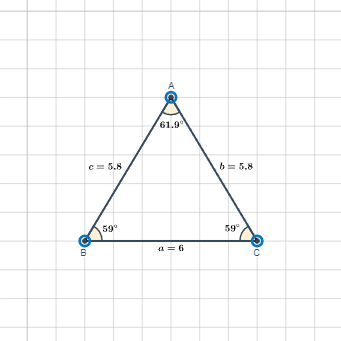
This example demonstrates the application of the Law of Sines in triangles, showing the relationship between side lengths and angles using trigonometric functions. Key mathematical concepts include the Law of Sines, trigonometric functions, and geometric construction. Construction involves using GeoGebra commands such as Polygon, Angle, Midpoint, and Circle to build triangles and related figures. Suitable for middle or high school mathematics education, helping students understand the connection between trigonometry and geometry, and exploring geometric properties through dynamic graphics.
GeoGebra Commands & Parameters
Polygon(A, B, C) → poly1, a, c, bAngle(C, B, A) → αAngle(B, A, C) → βAngle(A, C, B) → γMidpoint(A, B) → DMidpoint(A, C) → EMidpoint(B, C) → FAngle(C, B, A) → δAngle(B, A, C) → εAngle(A, C, B) → ζCircle(B, 1) → dAngularBisector(A, B, C) → fCircle(C, 1) → gCircle(A, 1) → hAngularBisector(A, C, B) → iAngularBisector(B, A, C) → jIntersect(d, f, 2) → GIntersect(h, j, 2) → HIntersect(g, i, 2) → I
AI Drawing Prompt Reference
Draw a triangle with labeled interior angles. Construct three circles centered at the vertices with radius 1. Find the midpoints of each side and connect them. Draw the angle bisectors from each vertex, and locate their intersections with the corresponding circles to form a new triangle.
The prompt above was compiled from the original drawing commands and is for reference only.