
Lattice Parallelogram Exploration
Loading the math board and drawing, please wait…
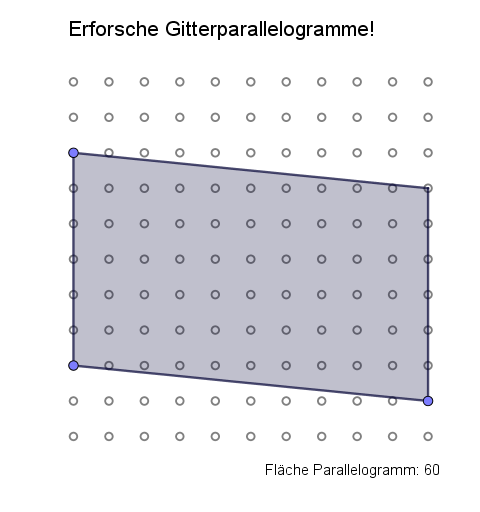
① This GeoGebra example constructs a parallelogram on an integer-coordinate lattice, dynamically showing its vertices, sides, and diagonals. ② Core math concepts include coordinate geometry, parallelogram properties, vectors (diagonal vectors), and classification of special quadrilaterals (rectangle, rhombus, square), along with set theory of lattice points and ratio relationships. ③ Construction uses Sequence to generate lattice points, Point for vertices P, Q, R, Line for sides f, g, h, i, Intersect for intersection points, Polygon for quadrilateral A; vectors v1, q, p, r illustrate diagonal or side vectors, and Text1/Text2 display values or explanations. ④ Suitable for middle and high school students learning analytic geometry and quadrilateral properties, also useful for teacher demonstrations to visualize parallelogram construction and classification on a coordinate grid.
GeoGebra Commands & Parameters
Sequence(Sequence[(j, k), j, 0, 10], k, 0, 10) → Gitter, {{(0, 0), (1, 0), (2, 0), (3, 0), (4, 0), (5, 0), (6, 0), (7, 0), (8, 0), (9, 0), (10, 0)}, {(0, 1), (1, 1), (2, 1), (3, 1), (4, 1), (5, 1), (6, 1), (7, 1), (8, 1), (9, 1), (10, 1)}, {(0, 2), (1, 2), (2, 2), (3, 2), (4, 2), (5, 2), (6, 2), (7, 2), (8, 2), (9, 2), (10, 2)}, {(0, 3), (1, 3), (2, 3), (3, 3), (4, 3), (5, 3), (6, 3), (7, 3), (8, 3), (9, 3), (10, 3)}, {(0, 4), (1, 4), (2, 4), (3, 4), (4, 4), (5, 4), (6, 4), (7, 4), (8, 4), (9, 4), (10, 4)}, {(0, 5), (1, 5), (2, 5), (3, 5), (4, 5), (5, 5), (6, 5), (7, 5), (8, 5), (9, 5), (10, 5)}, {(0, 6), (1, 6), (2, 6), (3, 6), (4, 6), (5, 6), (6, 6), (7, 6), (8, 6), (9, 6), (10, 6)}, {(0, 7), (1, 7), (2, 7), (3, 7), (4, 7), (5, 7), (6, 7), (7, 7), (8, 7), (9, 7), (10, 7)}, {(0, 8), (1, 8), (2, 8), (3, 8), (4, 8), (5, 8), (6, 8), (7, 8), (8, 8), (9, 8), (10, 8)}, {(0, 9), (1, 9), (2, 9), (3, 9), (4, 9), (5, 9), (6, 9), (7, 9), (8, 9), (9, 9), (10, 9)}, {(0, 10), (1, 10), (2, 10), (3, 10), (4, 10), (5, 10), (6, 10), (7, 10), (8, 10), (9, 10), (10, 10)}}Point(Gitter) → PPoint(Gitter) → QPoint(Gitter) → RLine(Q, P) → fLine(R, f) → gLine(P, R) → hLine(Q, h) → iIntersect(i, g) → APolygon(Q, P, R, A) → v1, q, p, r, a
AI Drawing Prompt Reference
Draw a parallelogram on a coordinate grid using integer-coordinate points as vertices, dynamically showing the vertices, sides, and diagonals. First, generate a 10x10 integer coordinate grid. Then, select four points on the grid to be the vertices of the parallelogram. Connect these points to form four sides and draw the diagonals. Mark the intersection point of the diagonals and use the vertices and intersection point to form a quadrilateral. Also, represent the diagonals and sides with vectors and display relevant values and explanations next to the diagram.
The prompt above was compiled from the original drawing commands and is for reference only.