
Klein Bottle Surface
Loading the math board and drawing, please wait…
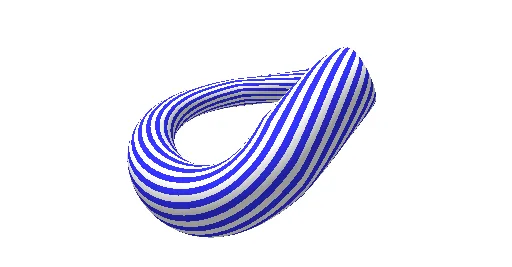
This example demonstrates the surface of a Klein bottle, a non-orientable topological object with no inside or outside. Using the Sequence command in GeoGebra, the generation process of the Klein bottle is dynamically displayed. The example involves concepts from coordinate geometry and topology, suitable for high school students and math enthusiasts.
GeoGebra Commands & Parameters
Sequence(Surface[If[0 ≤ u < π, gx1(u, v), gx2(u, v)], If[0 ≤ u < π, gy1(u, v), gy2(u, v)], gz(u, v), u, 0, (2 * π), v, i + π / n, i + (2 * π / n)], i, 0, (2 * π), (2 * π / n)) → blackSequence(Surface[If[0 ≤ u < π, gx1(u, v), gx2(u, v)], If[0 ≤ u < π, gy1(u, v), gy2(u, v)], gz(u, v), u, 0, (2 * π), v, i, i + π / n], i, 0, (2 * π), (2 * π / n)) → white
AI Drawing Prompt Reference
Draw a Klein bottle surface composed of alternating black and white strips, forming a self-intersecting closed tube. The surface is defined by two parametric segments: for parameter u from 0 to π, use one set of horizontal coordinate functions, and for u from π to 2π, use another set, while the vertical coordinate remains the same. Divide the full circular range into n equal intervals, and for each interval, create a black strip covering the first half and a white strip covering the second half, so that the strips tile the entire surface. The final shape should clearly show the non-orientable nature, with the inside and outside smoothly connected without a distinct boundary.
The prompt above was compiled from the original drawing commands and is for reference only.