
Kite Tessellation: Constructing a Quadrilateral Tiling via Rotation and Translat
Loading the math board and drawing, please wait…
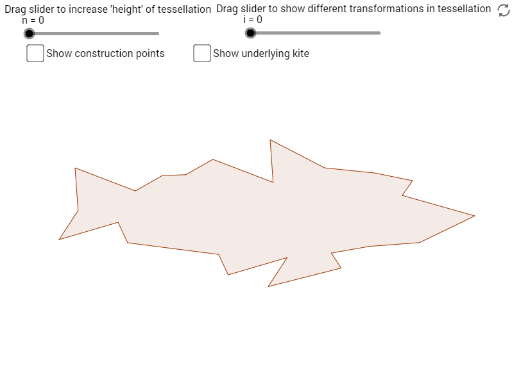
① This example demonstrates how to create a seamless tessellation on the plane using a kite-shaped quadrilateral (Kite) through rotations and translations, illustrating the fundamental principles of geometric tiling. ② Core mathematical concepts include quadrilaterals (especially kites), equilateral triangles, squares, rectangles, rotational symmetry, translational symmetry, and a subtle connection to indefinite integrals (possibly related to area or transformations). ③ Construction highlights: Based on the construction summary, the GeoGebra commands used include Line, Mirror, Polygon, Midpoint, Rotate, Join, OrthogonalLine, Vector, Translate, and Zip, with objects such as points A, B, C, polygon kite, edges edge1/2/3, halfedges, and multiple polygons poly1 and their copies, generated by rotation and translation to form the tessellation. ④ Suitable for high school geometry or college transformation geometry courses, also useful for teachers demonstrating tessellations and transformations interactively, or as creative material for mathematical art.
GeoGebra Commands & Parameters
Line(A, C) → fMirror(B, f) → B'Polygon(A, B, C, B') → kite, a, b, c, b'Midpoint(b') → ORotate(halfedge2, 180°, O) → nhalfedge2Join({halfedge2, Reverse[nhalfedge2]}) → edge2Midpoint(a) → MRotate(halfedge1, 180°, M) → nhalfedge1Join({halfedge1, Reverse[nhalfedge1]}) → edge1OrthogonalLine(C, f) → gVector(C, B') → uMirror(edge3, g) → edge3'Translate(edge3', u) → edge3''Polygon(Flatten[{edge1, edge3, edge3'', Reverse[edge2]}]) → poly1Rotate(poly1, 180°, M) → poly1'Vector(B, B') → vZip(Translate[poly1, Vector[vv]], Vector[vv], Sequence[(t * v), t, (-n), n]) → list2Zip(Translate[poly1', Vector[vv]], Vector[vv], Sequence[(t * v), t, (-n), n]) → list3Mirror(poly1, g) → poly1'_1Translate(poly1'_1, u) → poly2Zip(Translate[poly2, Vector[vv]], Vector[vv], Sequence[(t * v), t, (-n), n]) → list4Rotate(poly2, 180°, B) → poly2'Vector(A, B') → wTranslate(Rotate[poly2, 180°, C], w) → poly3Rotate(poly2, 180°, M) → poly2'_1Zip(Translate[poly3, Vector[vv]], Vector[vv], Sequence[(t * v), t, (-n), n]) → list5Translate({list2, list3, list4, list5}, Vector[(2 * Vector[A, C])]) → list1Translate(list1, Vector[(-4 * Vector[A, C])]) → list1'Zip(Polygon[Translate[A, Vector[vv]], Translate[B, Vector[vv]], Translate[C, Vector[vv]], Translate[B', Vector[vv]]], Vector[vv], Sequence[(t * v), t, (-n), n]) → k1Zip(Translate[Polygon[Rotate[A, 180°, M], Rotate[B, 180°, M], Rotate[C, 180°, M], Rotate[B', 180°, M]], Vector[vv]], Vector[vv], Sequence[(t * v), t, (-n), n]) → k2Zip(Translate[Translate[Polygon[Mirror[A, g], Mirror[B, g], Mirror[C, g], Mirror[B', g]], u], Vector[vv]], Vector[vv], Sequence[(t * v), t, (-n), n]) → k3Vector(A, C) → hZip(Translate[Translate[Polygon[Mirror[A, f], Mirror[B, f], Mirror[C, f], Mirror[B', f]], h], Vector[vv]], Vector[vv], Sequence[(t * v), t, (-n), n]) → k4
AI Drawing Prompt Reference
Create a seamless tessellation using kite-shaped quadrilaterals through rotations and translations to demonstrate geometric tiling principles. Start by constructing a kite, then generate multiple copies by rotating it 180 degrees and translating it. These copies are symmetrically arranged around a central point, forming a continuous pattern. The design features multiple kites and triangles, with midpoints and orthogonal lines aiding the construction, showcasing rotational and translational symmetry, resulting in a visually appealing geometric artwork.
The prompt above was compiled from the original drawing commands and is for reference only.