
Kite Properties Exploration by Philip Collett
Loading the math board and drawing, please wait…
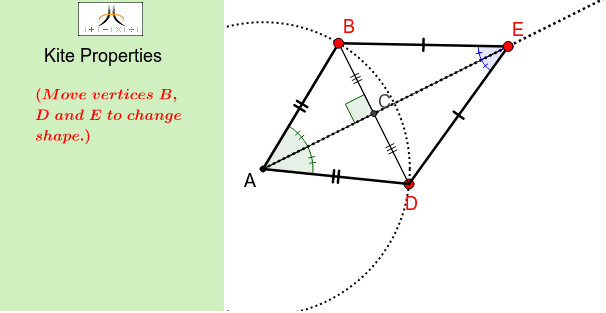
This example demonstrates the geometric properties of a kite, including perpendicular and bisecting diagonals, equal sides, and congruent opposite angles. Core concepts involve parallelograms, isosceles triangles, line segments, circles, and more. It is constructed using GeoGebra commands like Corner, Polygon, Segment, Circle, Point, Midpoint, Ray, and Angle. Suitable for middle school students and above for learning and teaching kite geometry.
GeoGebra Commands & Parameters
Corner(1, 1) → Cnr1Corner(1, 2) → Cnr2Corner(1, 3) → Cnr3Corner(1, 4) → Cnr4Polygon(CN1, CN2, CN3, CN4) → Panel, cn1, cn2, cn3, cn4Segment(A, D) → pCircle(A, D) → cPoint(c) → BMidpoint(B, D) → CRay(A, C) → aPoint(a) → ESegment(A, B) → bSegment(B, E) → dSegment(E, D) → eSegment(D, B) → fAngle(B, C, A) → αSegment(B, C) → gSegment(D, C) → hSegment(A, E) → iAngle(D, A, E) → βAngle(E, A, B) → γAngle(A, E, D) → δAngle(B, E, A) → ε
AI Drawing Prompt Reference
Draw a kite-shaped geometric figure. Start with a rectangular background panel. Inside it, draw a circle using a given segment as radius, and place a point on the circle as one vertex of the kite. Connect this point to the other endpoint of the segment)Skip the midpoint of that segment. From the midpoint, draw a ray toward the starting point, and place another point on this ray. Connect all points to form the four sides of the kite. Then draw the diagonals, marking the right angle at their intersection, and the two equal angles at the top vertex and the two equal angles at the bottom vertex.
The prompt above was compiled from the original drawing commands and is for reference only.