
Jauregui Connections Map: Segment Links and Geometric Transformations
Loading the math board and drawing, please wait…
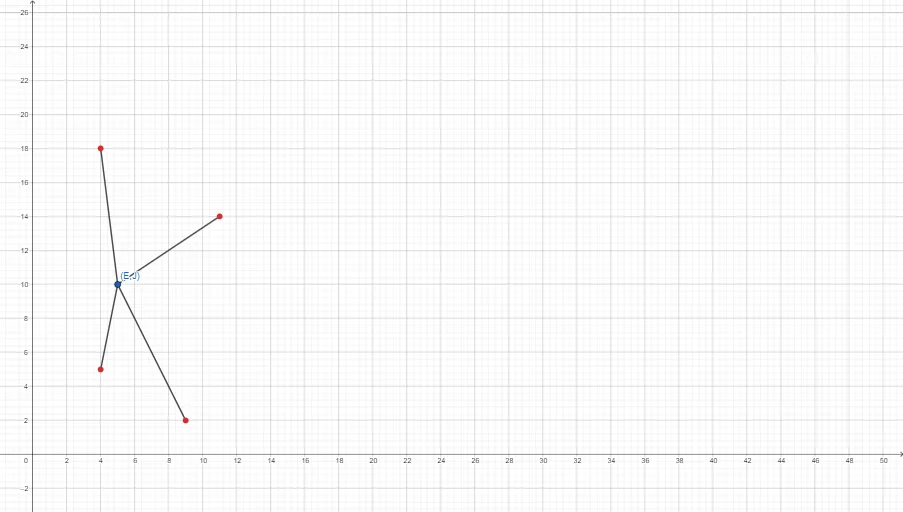
This example demonstrates a “connections map” for geometry: by constructing and linking several segments/points, it visually encodes how different geometric objects correspond to each other within a single diagram. The key mathematical ideas are geometric construction using segments, the notion of point-to-object connections, and the visualization of geometric transformation relationships through those links. From the provided GeoGebra construction summary, the main building step is the Segment command, creating segment objects using the named points/objects: A, B, f, C, g, D, h, E, i. These coordinated segment connections form the structured connection layout shown in the map. Suitable for middle-school geometry exploration and classroom demonstrations of correspondence/transform visualization in dynamic geometry software.
GeoGebra Commands & Parameters
Segment(A, B) → fSegment(A, C) → gSegment(A, D) → hSegment(A, E) → i
AI Drawing Prompt Reference
On a single coordinate plane, place one fixed starting point and four distinct target points. Draw four separate line segments such that each segment connects the starting point to one target point, forming a “connections map” layout centered at the starting point. Make the four connections clearly distinguishable as the segment from the start to the first target, to the second target, to the third target, and to the fourth target. Construct by first positioning the points, then drawing the four segments in sequence.
The prompt above was compiled from the original drawing commands and is for reference only.