
iOS Logo Geometric Construction Demo
Loading the math board and drawing, please wait…
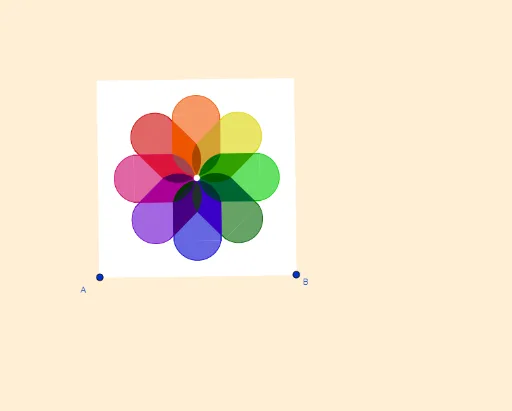
This example demonstrates how to construct the iOS Logo geometrically using GeoGebra, involving concepts like circles, reflections, rotations, similar triangles, and coordinate geometry. Key GeoGebra commands and objects used in the construction include LineBisector, Vector, OrthogonalVector, Line, OrthogonalLine, Intersect, Mirror, CircumcircleArc, Polygon, Rotate, and CircleArc. Suitable for high school students and math enthusiasts learning geometric transformations and coordinate geometry applications.
GeoGebra Commands & Parameters
LineBisector(A, B) → mVector(A, B) → uOrthogonalVector(u) → vLineBisector(A_1, A) → lLineBisector(A_1, A) → nLineBisector(A_1, A) → hLine(A, B) → sOrthogonalLine(D, s) → iIntersect(i, l) → PLine(Q, l) → tMirror(t, l) → t'OrthogonalLine(A, s) → bOrthogonalLine(B, u, xOyPlane) → gMirror(i, m) → i'OrthogonalLine(A_1, b) → rIntersect(g, r) → CIntersect(b, l) → OIntersect(b, t) → HMirror(H, l) → H'Intersect(m, l) → LMirror(A_1, l) → D_2Mirror(A_1, l) → F_2Mirror(C, l) → C'_1OrthogonalLine(F, b) → fMirror(f, l) → f'Mirror(f, l) → f'_1Intersect(m, f) → MIntersect(m, t) → GOrthogonalLine(E, l) → jMirror(F, l) → F'OrthogonalLine(I, b) → kIntersect(t, m) → KOrthogonalLine(N, b) → pMirror(j, m) → j'Intersect(m, f') → SIntersect(k, j) → TIntersect(j', k) → ULineBisector(S, K) → qCircumcircleArc(U, S, T) → dMirror(U, q) → U'Mirror(S, q) → S'Mirror(T, q) → T'CircumcircleArc(U', S', T') → d'Polygon(U, T, T', U') → c1, u_1, t_1, a, u'Mirror(U, l) → U'_1Mirror(S, l) → S'_1Mirror(T, l) → T'_1CircumcircleArc(U'_1, S'_1, T'_1) → d'_1Mirror(U, l) → U'_2Mirror(T, l) → T'_2Mirror(T', l) → T''Mirror(U', l) → U''Polygon(U'_2, T'_2, T'', U'') → c1', u'_2, t'_2, t'', u''Mirror(U', l) → U''_1Mirror(S', l) → S''Mirror(T', l) → T''_1CircumcircleArc(U''_1, S'', T''_1) → d''Rotate(U, 45°, L) → U'_3Rotate(S, 45°, L) → S'_2Rotate(T, 45°, L) → T'_3CircumcircleArc(U'_3, S'_2, T'_3) → d'_2Rotate(U, 45°, L) → U'_4Rotate(T, 45°, L) → T'_4Rotate(T', 45°, L) → T''_2Rotate(U', 45°, L) → U''_2Polygon(U'_4, T'_4, T''_2, U''_2) → c1'_1, u'_4, t'_4, t''_2, u''_2Rotate(U', 45°, L) → U''_3Rotate(S', 45°, L) → S''_1Rotate(T', 45°, L) → T''_3CircumcircleArc(U''_3, S''_1, T''_3) → d''_1Rotate(U'_3, 45°, L) → RRotate(S'_2, 45°, L) → VRotate(T'_3, 45°, L) → WCircumcircleArc(R, V, W) → cRotate(U'_4, 45°, L) → ZRotate(T'_4, 45°, L) → B_1Rotate(T''_2, 45°, L) → C_1Rotate(U''_2, 45°, L) → D_1Polygon(Z, B_1, C_1, D_1) → c2, z_1, b_1, c_1, d_1Rotate(U''_3, 45°, L) → E_1Rotate(S''_1, 45°, L) → F_1Rotate(T''_3, 45°, L) → G_1CircumcircleArc(E_1, F_1, G_1) → eRotate(R, 45°, L) → R'Rotate(V, 45°, L) → V'Rotate(W, 45°, L) → W'CircumcircleArc(R', V', W') → c'Rotate(Z, 45°, L) → Z'Rotate(B_1, 45°, L) → H_1Rotate(C_1, 45°, L) → I_1Rotate(D_1, 45°, L) → J_1Polygon(Z', H_1, I_1, J_1) → c2', z', h_1, i_1, j_1Rotate(E_1, 45°, L) → K_1Rotate(F_1, 45°, L) → L_1Rotate(G_1, 45°, L) → M_1CircumcircleArc(K_1, L_1, M_1) → e'Mirror(U'_3, m) → N_1Mirror(S'_2, m) → O_1Mirror(T'_3, m) → P_1CircumcircleArc(N_1, O_1, P_1) → f_1Mirror(U'_4, m) → Q_1Mirror(T'_4, m) → R_1Mirror(T''_2, m) → S_1Mirror(U''_2, m) → T_1Polygon(Q_1, R_1, S_1, T_1) → c3, q_1, r_1, s_1, g_1Mirror(K_1, m) → U_1Mirror(L_1, m) → V_1Mirror(M_1, m) → W_1CircumcircleArc(U_1, V_1, W_1) → e''Mirror(U''_3, m) → Z_1Mirror(S''_1, m) → A_2Mirror(T''_3, m) → B_2CircumcircleArc(Z_1, A_2, B_2) → k_1Mirror(Z', m) → Z''Mirror(H_1, m) → C_2Mirror(I_1, m) → E_2Mirror(J_1, m) → G_2Polygon(Z'', C_2, E_2, G_2) → c2'', z'', c_2, l_1, g_2Mirror(R', m) → R''Mirror(V', m) → V''Mirror(W', m) → W''CircumcircleArc(R'', V'', W'') → c''Mirror(R, m) → R'_1Mirror(V, m) → V'_1Mirror(W, m) → W'_1CircumcircleArc(R'_1, V'_1, W'_1) → c'_1Mirror(Z, m) → Z'_1Mirror(B_1, m) → H_2Mirror(C_1, m) → I_2Mirror(D_1, m) → J_2Polygon(Z'_1, H_2, I_2, J_2) → c2'_1, z'_1, h_2, i_2, j_2Mirror(E_1, m) → K_2Mirror(F_1, m) → L_2Mirror(G_1, m) → M_2CircumcircleArc(K_2, L_2, M_2) → e'_1Polygon(A_1, C, B, A) → c4, a_1, c_3, b_2, a_2LineBisector(T_1, K) → m_1Intersect(m_1, j) → N_2CircleArc(N_2, K, T_1) → p_1Mirror(p_1, m) → d_2Mirror(p_1, l) → f_2Mirror(d_2, l) → k_2Rotate(p_1, 45°, L) → p_2Rotate(d_2, 45°, L) → q_2Rotate(p_2, 45°, L) → r_2Rotate(q_2, 45°, L) → s_2Rotate(r_2, 45°, L) → t_2Rotate(s_2, 45°, L) → d_3Mirror(p_2, m) → e_3Mirror(q_2, m) → f_3Mirror(r_2, m) → g_3Mirror(s_2, m) → h_3Rotate(g_3, (-(45°)), L) → k_3Rotate(h_3, (-(45°)), L) → p_3Intersect(t_1, u''_2) → O_2Polygon(O_2, T', S''_1, K, T_1) → polígono1, o_2, n_1, s''_1, k_4, l_2Rotate(O_2, 45°, L) → P_2Rotate(T', 45°, L) → T''_4Rotate(S''_1, 45°, L) → Q_2Rotate(K, 45°, L) → K'Rotate(T_1, 45°, L) → R_2Polygon(P_2, T''_4, Q_2, K', R_2) → polígono1', m_2, t''_4, n_2, k', i_3Rotate(P_2, 45°, L) → S_2Rotate(T''_4, 45°, L) → T_2Rotate(Q_2, 45°, L) → U_2Rotate(K', 45°, L) → K''Rotate(R_2, 45°, L) → V_2Polygon(S_2, T_2, U_2, K'', V_2) → polígono1'', j_3, l_3, u_2, k'', v_2Rotate(S_2, 45°, L) → W_2Rotate(T_2, 45°, L) → Z_2Rotate(U_2, 45°, L) → A_3Rotate(K'', 45°, L) → K'''Rotate(V_2, 45°, L) → B_3Polygon(W_2, Z_2, A_3, K''', B_3) → polígono1''', w_2, z_2, m_3, k''', b_3Rotate(W_2, 45°, L) → C_3Rotate(Z_2, 45°, L) → D_3Rotate(A_3, 45°, L) → E_3Rotate(K''', 45°, L) → F_3Rotate(B_3, 45°, L) → G_3Polygon(C_3, D_3, E_3, F_3, G_3) → polígono2, n_3, q_3, r_3, s_3, t_3Rotate(C_3, 45°, L) → H_3Rotate(D_3, 45°, L) → I_3Rotate(E_3, 45°, L) → J_3Rotate(F_3, 45°, L) → K_3Rotate(G_3, 45°, L) → L_3Polygon(H_3, I_3, J_3, K_3, L_3) → polígono2', f_4, g_4, h_4, i_4, j_4Rotate(H_3, 45°, L) → M_3Rotate(I_3, 45°, L) → N_3Rotate(J_3, 45°, L) → O_3Rotate(K_3, 45°, L) → P_3Rotate(L_3, 45°, L) → Q_3Polygon(M_3, N_3, O_3, P_3, Q_3) → polígono2'', l_4, m_4, o_3, n_4, p_4Rotate(M_3, 45°, L) → R_3Rotate(N_3, 45°, L) → S_3Rotate(O_3, 45°, L) → T_3Rotate(P_3, 45°, L) → U_3Rotate(Q_3, 45°, L) → V_3Polygon(R_3, S_3, T_3, U_3, V_3) → polígono2''', q_4, r_4, s_4, u_3, v_3
AI Drawing Prompt Reference
Draw a geometric construction of the iOS Logo, involving multiple circles, lines, and reflections, to demonstrate how to build the shape using bisectors, vectors, orthogonal lines, and rotations. Start by drawing base lines and bisectors, then construct key points using vectors and orthogonal vectors, generate the various parts of the shape through reflections and rotations, and finally combine them into a polygon similar to the iOS Logo, adding arcs to match the logo's form.
The prompt above was compiled from the original drawing commands and is for reference only.