
Investigation of Perpendicular Lines
Loading the math board and drawing, please wait…
In collections
A1.ACE.1 - Create and solve equations and inequalities
Expressing Geometric Properties with Equations (GPE) Cluster
Slope
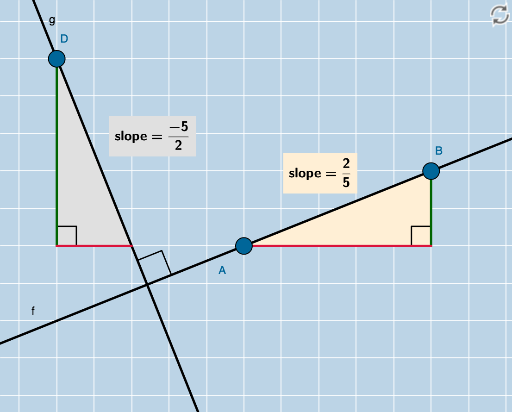
This example demonstrates perpendicular lines in the coordinate plane. Key mathematical concepts include straight lines and the properties of perpendicular lines. Using GeoGebra commands such as Line, Intersect, and OrthogonalLine, you can construct perpendicular lines and explore their properties. Suitable for students at the junior high school level and above, focusing on coordinate geometry.
GeoGebra Commands & Parameters
Line(A, B) → fIntersect(g_2, h) → CPolygon(A, C, B) → poly1, b, a, cSegment(A, C) → iSegment(C, B) → jAngle(B, C, A) → αSlope(f) → d_1FractionText(d_1) → text1Denominator(d_1) → dNumerator(d_1) → nOrthogonalLine(D, f) → gIntersect(l, m) → FPolygon(D, F, E) → poly2, e, d_2, f_1Polygon(H, G, A) → poly3, a_1, h_1, g_1Segment(H, G) → pSegment(G, A) → qSegment(D, F) → rSegment(F, E) → sAngle(H, G, A) → βAngle(E, F, D) → γIntersect(f, g) → IAngle(B, I, D) → δFractionText(Slope[g]) → text2Distance(D, I) → distanceDIDistance(D, E) → distanceDEDistance(A, B) → distanceAB
AI Drawing Prompt Reference
Draw a straight line in the coordinate plane and construct a perpendicular line to it, marking their intersection point. Form a triangle using the two lines and part of the original line, and measure the angles and hypotenuse lengths of the two right-angled triangles, noting the slope values. Then, from a point on the perpendicular line, draw two line segments intersecting the original line and the perpendicular line to form two new triangles, measuring relevant side lengths and angles.
The prompt above was compiled from the original drawing commands and is for reference only.