
Inverse Functions Algebra Practice: Interactive Function Inversion
Loading the math board and drawing, please wait…
In collections
Grade 12 PreCalculus BC
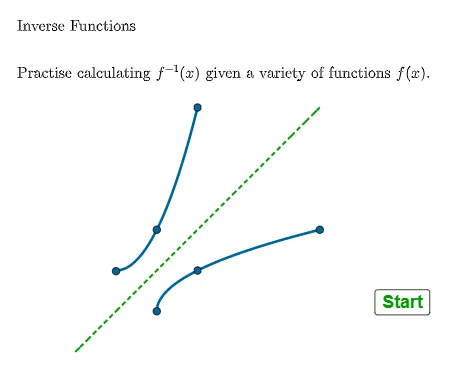
① This example demonstrates how to find the inverse of given functions algebraically and dynamically displays the relationship between the original function and its inverse in GeoGebra. ② Core mathematical concepts include the definition of inverse functions, swapping domain and range, the identity property f(f⁻¹(x))=x, and simplification of rational functions. ③ Construction highlights: using GeoGebra commands such as GCD, Simplify, Shuffle, If, Invert, FractionText, Point, and Corner, the applet builds multiple function objects (f1, f2, f4, f5) and their inverses (f1inv, f4inv, f5inv), with buttons (button1, button2) to generate random questions and check answers, and lists (alist, blist, qlist) to manage answer choices. ④ Suitable for high school or pre-university students learning functions and inverse functions, this interactive tool supports classroom practice or self-study, reinforcing algebraic inversion techniques and the symmetry of graphs.
GeoGebra Commands & Parameters
GCD({f4c, (f4c * f4b) + f4a}) → f4gcdSimplify((((x * f4gcd) * f4b) + f4a - (f4c * f4b)) / ((f4gcd * x) - f4c)) → f4invGCD(fa, fb) → f1gcdShuffle(qlist) → qsh, {1, 2, 4, 3, 5}GCD({fa, fb}) → f5gcdSimplify(((fa * x) + fb) / f1gcd) → f1Simplify(x^(2) + (fa * x) + fb) → f2Simplify((f4a / (x - f4b) + f4c) / f4gcd) → f4If(question ≟ 1, Element[qsh, 1], If[question ≟ 2, Element[qsh, 2], If[question ≟ 3, Element[qsh, 3], If[question ≟ 4, Element[qsh, 4], Element[qsh, 5]]]]) → qQInvert(f1) → f1invInvert(f5) → f5invIf(qQ ≟ 1, f1, If[qQ ≟ 2, f2, If[qQ ≟ 3, f2, If[qQ ≟ 4, f4, If[qQ ≟ 5, f5]]]]) → fFractionText(f4dom) → f3domtxtFractionText(f5int) → f5inttextIf(qQ ≟ 1, ftext1, If[qQ ≟ 2, ftext2, If[qQ ≟ 3, ftext3, If[qQ ≟ 4, ftext4, ftext5]]]) → ftextIf(qQ ≟ 1, f1invtxt, If[qQ ≟ 2, f2invtxt, If[qQ ≟ 3, f3invtxt, If[qQ ≟ 4, f4invtxt, f5invtxt]]]) → finvtxtPoint(yAxis) → SC1APoint(sc12) → SC1DPoint(sc12) → SC1EPoint(sc12) → SC1FCorner(5) → dims
AI Drawing Prompt Reference
Create an interactive graph showing the dynamic relationship between original functions and their inverses for algebra practice. Include multiple function objects and their inverses, with buttons to generate random questions and check answers. Use lists to manage options, points to mark key positions, and display function expressions and domains. Highlight the symmetry of original and inverse function graphs about the line y=x, suitable for high school students learning function inversion and graph symmetry.
The prompt above was compiled from the original drawing commands and is for reference only.