
Introduction to Geometric Dilation: Exploring Scale Effects
Loading the math board and drawing, please wait…
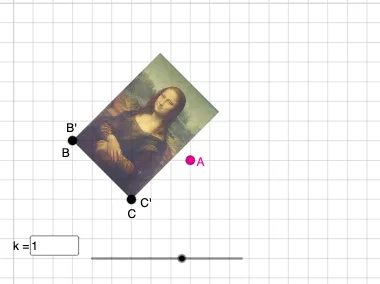
This GeoGebra example demonstrates geometric dilation (scaling) transformations dynamically. Core mathematical concepts include: similar transformations, scale factors, and center-based scaling. Construction highlights: Using the Dilate command to scale polygons around point C, combined with Vector for translation, Rotate and Mirror for showing different transformation effects. Objects involved: points A, B, D, E, circles, lines, and more. Suitable for middle to high school mathematics curricula, useful for understanding similarity concepts, mastering geometric transformation operations, and developing observation and exploration skills.
GeoGebra Commands & Parameters
Vector(D, E) → uTranslate(pic1, u) → pic1'Translate(B, u) → B'_{4}Translate(C, u) → C'_{4}Vector(B, B'_{4}) → vRotate(C, δ, A) → C'_1CircleArc(A, C'_1, C) → cCircleArc(A, C, C'_1) → dCircle(A, C) → eLine(F, G) → fMirror(pic1, f) → pic1'_2Mirror(B, f) → B'_{2}Mirror(C, f) → C'_{2}Dilate(pic1, k, A) → pic1'_3Dilate(B, k, A) → B'Dilate(C, k, A) → C'Rotate(B, δ, A) → B'_1Rotate(pic1, δ, A) → pic1'_1Circle(A, C) → pCircleArc(A, C'_1, C) → rTextfield(δ) → InputBox1Textfield(k) → InputBox2Intersect(q, eq1) → H
AI Drawing Prompt Reference
Demonstrate dynamic geometric dilation (scaling) transformations by scaling polygons around a central point, combining vector translation, rotation, and reflection to show different transformation effects, involving similar figures, scale factors, and central scaling, with circles and lines for illustration, suitable for middle to high school students to understand similarity and geometric transformations.
The prompt above was compiled from the original drawing commands and is for reference only.