
Intersecting Spheres and Cones in 3D
Loading the math board and drawing, please wait…
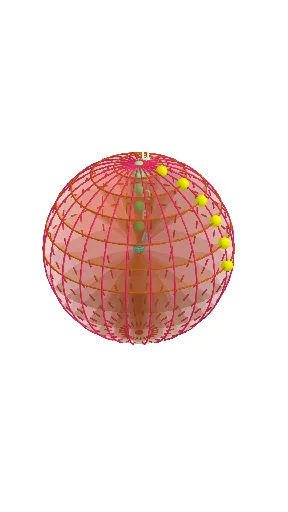
This GeoGebra example demonstrates how a sphere and a cone intersect in 3D space, producing visible intersection curves/paths and enabling distance measurements from constructed points. It focuses on solid geometry relationships among sphere, cone, and their cross-sectional geometry. Key concepts include 3D geometry modeling, finding intersections between geometric objects, using planes and lines to obtain cross sections, and measuring distances to verify relationships. Construction is built by creating a Sphere and a Cone, then introducing auxiliary Line and Plane objects to compute intersection results via Intersect and IntersectPath. Transformations such as Rotate and Mirror are used to generate symmetric or rotated configurations for clearer visualization. Measure-and-label steps use Distance for quantitative outputs and Text for annotations. Main commands used are Intersect, Point, Sphere, Line, Rotate, Plane, IntersectPath, Segment, Circle, Distance, Cone, and Mirror (with Text for labeling). The named objects (e.g., key points and distance variables) support tracking the computed geometry. Suitable for upper-secondary students and early university learners studying solid geometry, geometric construction, and 3D visualization.
GeoGebra Commands & Parameters
Intersect(zAxis, yAxis) → APoint(zAxis) → BSphere(A, B) → aIntersect(xAxis, a, 2) → CLine(A, C) → fPoint(yAxis) → DLine(A, D) → gRotate(f, (-(15°)), g) → f'Rotate(f', (-(15°)), g) → f''Rotate(f'', (-(15°)), g) → f'''Rotate(f''', (-(15°)), g) → hRotate(h, (-(15°)), g) → h'Plane(A, C, D) → pIntersectPath(p, a) → cPoint(f) → EIntersect(f', a) → F, GIntersect(f'', a) → H, IIntersect(f''', a) → J, KIntersect(h, a) → L, MIntersect(h', a) → N, OLine(A, B) → iSegment(C, E) → jRotate(G, 90°, i) → G'Rotate(G, 180°, i) → G'_1Circle(G, G', G'_1) → dCircle(i, I) → eCircle(i, K) → kCircle(i, O) → qCircle(i, M) → rLine(G, j) → lIntersect(l, i) → PDistance(A, P) → distanceAPCone(d, (-distanceAP)) → b, b_2, b_3Line(I, j) → mIntersect(m, i) → QDistance(A, Q) → distanceAQCone(e, (-distanceAQ)) → n, s, oIntersect(i, k) → R,Line(K, j) → tIntersect(t, i) → SDistance(A, S) → distanceASCone(k, (-distanceAS)) → u, c_1, vLine(M, j) → f_1Intersect(f_1, i) → TDistance(A, T) → distanceATCone(r, (-distanceAT)) → w, d_1, a_1Line(O, j) → g_1Intersect(g_1, i) → UDistance(A, U) → distanceAUCone(q, (-distanceAU)) → b_1, e_1, h_1Circle(i, E) → k_1Circle(O, K, C) → p_1Rotate(p_1, 15°, i) → q_1Rotate(p_1, 30°, i) → r_1Rotate(p_1, 45°, i) → s_1Rotate(p_1, 60°, i) → t_1Rotate(p_1, 75°, i) → c_2Rotate(p_1, 90°, i) → d_2Mirror(b_3, xOyPlane) → i_1Mirror(v, xOyPlane) → v'Intersect(g, c) → V, WPlane(A, W, C) → p_2Mirror(h_1, p_2) → j_1Mirror(a_1, p_2) → l_1Mirror(o, p_2) → o'Rotate(p_1, (-(15°)), i) → e_2Rotate(p_1, (-(30°)), i) → f_2Rotate(p_1, (-(45°)), i) → g_2Rotate(p_1, (-(60°)), i) → h_2Rotate(p_1, (-(75°)), i) → k_2
AI Drawing Prompt Reference
Draw a 3D graph showing the intersection of a sphere and a cone. The graph should include a sphere and a cone that intersect to produce visible intersection curves. Use auxiliary lines and planes to calculate intersection paths, and apply rotation to generate symmetric or rotated configurations. Measure distances from constructed points to intersection points to verify geometric relationships. Also include circles, line segments, and distance labels to illustrate the geometric relationships between the sphere, cone, and their cross-sections.
The prompt above was compiled from the original drawing commands and is for reference only.