
Cross-Sections of a Sphere, Cone, and Cylinder: Cutting with a Moving Plane
Loading the math board and drawing, please wait…
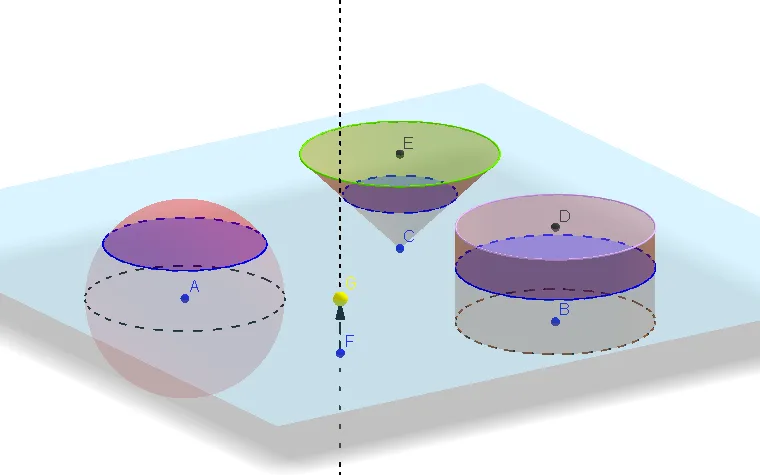
This example demonstrates how the same cutting process—intersecting a solid with a (typically orthogonal) plane—produces different cross-sectional curves for a sphere, a cone, and a cylinder. It highlights the geometric phenomenon that the cross-section shape depends on the solids’ equations/structure and the plane’s position. Key concepts include solid geometry slicing, cross-section curves (e.g., circles), and construction techniques using orthogonal planes/lines to control the slice. In GeoGebra, it builds the solids with Sphere, Cylinder, and Cone; defines a slicing/orthogonal cutting plane via OrthogonalPlane (and related helpers like OrthogonalLine); computes the intersection curve using IntersectPath; and uses Vector and Translate to specify direction/placement (e.g., for moving the cutting plane). Circle, Point, and Corner help locate and visualize critical geometric elements of the sections. Suitable for middle school through early undergraduate solid geometry lessons, classroom demonstrations, and learners practicing spatial intuition and geometric construction.
GeoGebra Commands & Parameters
OrthogonalLine(A, xOyPlane) → aCircle(A, 2, a) → cVector(A, B) → uTranslate(c, u) → c'Sphere(A, 2) → bCylinder(B, D, 2) → d, e, f, gOrthogonalLine(F, xOyPlane) → jPoint(j) → GOrthogonalPlane(G, j) → lIntersectPath(l, b) → qIntersectPath(l, d) → rVector(A, E) → vTranslate(c, v) → c'_1Cone(E, C, 2) → h, k, iIntersectPath(l, h) → pCorner(p)Vector(F, G) → w
AI Drawing Prompt Reference
Draw a sphere, a cone, and a cylinder, and cut them with a moving plane to observe different cross-section shapes. First, draw a sphere, then a cone and a cylinder. Next, draw a line perpendicular to the xoy plane and use it to draw a circle. By translating this circle, simulate the movement of the plane. Finally, draw a plane perpendicular to the base of the cone and compute its intersection with the sphere, cylinder, and cone to show the changing cross-section shapes.
The prompt above was compiled from the original drawing commands and is for reference only.